We’d like to remind Forumites to please avoid political debate on the Forum.
This is to keep it a safe and useful space for MoneySaving discussions. Threads that are – or become – political in nature may be removed in line with the Forum’s rules. Thank you for your understanding.
📨 Have you signed up to the Forum's new Email Digest yet? Get a selection of trending threads sent straight to your inbox daily, weekly or monthly!
The Forum now has a brand new text editor, adding a bunch of handy features to use when creating posts. Read more in our how-to guide
How do I shrink my taskbar?

onejontwo
Posts: 1,089 Forumite


in Techie Stuff
My taskbar has suddenly doubled in width to about 1 inch whereas for the past several years it's been about 1/2 inch. Call me picky but when you get used to something it's annoying when it changes for no reason.
I've tried to change it by locking/unlocking the taskbar but no joy.
Help please!!!
I've tried to change it by locking/unlocking the taskbar but no joy.
Help please!!!
0
Comments
-
You can resize a taskbar by hovering the mouse cursor near the edge, and the cursor changes to a double arrow - left click to drag up or down as needed.
Other reasons for it to change size are things like the language bar, if it's been dragged a step up or such, or 3rd party programs sometimes like to alter it with their icons.
A screenshot might help.0 -
Try hovering your cursor over the top edge of the task bar until you get the vertical double ended arrow to appear, then right click and drag down to the desired size, it usually goes in steps of about a cm.0
-
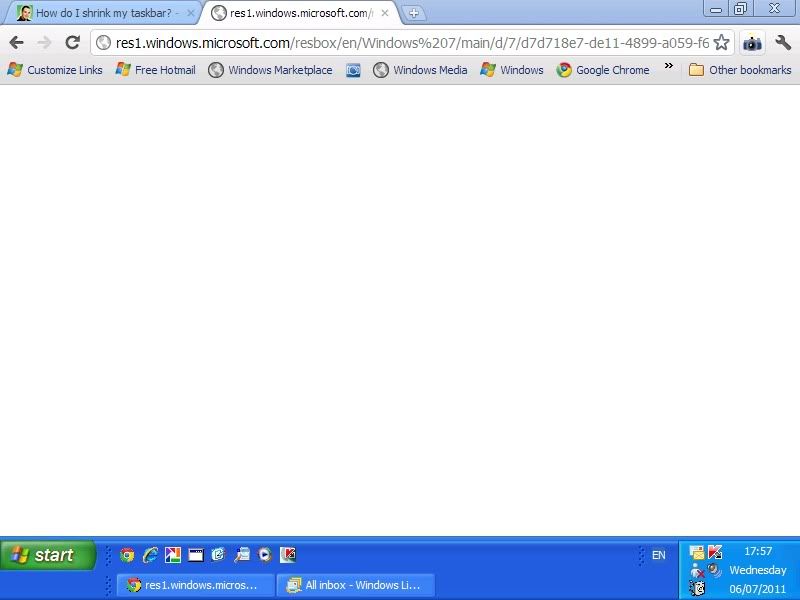 This any good?
I'm trying to get it to around half of this width. I can widen it even further but not any less apart from disappearing from view altogether.0 -
All sorted now after a bit of juggling. Thanks for the replies.0



This discussion has been closed.
Confirm your email address to Create Threads and Reply

Categories
- All Categories
- 353.5K Banking & Borrowing
- 254.2K Reduce Debt & Boost Income
- 455K Spending & Discounts
- 246.6K Work, Benefits & Business
- 602.9K Mortgages, Homes & Bills
- 178.1K Life & Family
- 260.6K Travel & Transport
- 1.5M Hobbies & Leisure
- 16K Discuss & Feedback
- 37.7K Read-Only Boards