We’d like to remind Forumites to please avoid political debate on the Forum.
This is to keep it a safe and useful space for MoneySaving discussions. Threads that are – or become – political in nature may be removed in line with the Forum’s rules. Thank you for your understanding.
📨 Have you signed up to the Forum's new Email Digest yet? Get a selection of trending threads sent straight to your inbox daily, weekly or monthly!
The Forum now has a brand new text editor, adding a bunch of handy features to use when creating posts. Read more in our how-to guide
HP 6735s laptop wont power up

Larry22
Posts: 75 Forumite


in Techie Stuff
Looking for some help please,
When I plug power adapter in there is a blue & yellow ring around it (where the plug fits into the laptop) but goes off after a second or 2, when I press the power button it lights up for about 5 or 6 seconds then goes off, the wireless light also flashes on then off, the blue & yellow ring around power flashes again then nothing! I've tried various power on/off hold for 15 seconds etc etc but still no joy, is it an expensive repair? any advice anyone?
cheers in advance
When I plug power adapter in there is a blue & yellow ring around it (where the plug fits into the laptop) but goes off after a second or 2, when I press the power button it lights up for about 5 or 6 seconds then goes off, the wireless light also flashes on then off, the blue & yellow ring around power flashes again then nothing! I've tried various power on/off hold for 15 seconds etc etc but still no joy, is it an expensive repair? any advice anyone?
cheers in advance
0
Comments
-
Take the battery out and try it without the battery.604!0
-
Wow what a fast reply! thanks, I've already tried that even left it out for a couple of days & bought a new power supply but still no joy.0
-
wiggle the cable a bit, could either be a dicky battery connection or a break in the cable.0
-
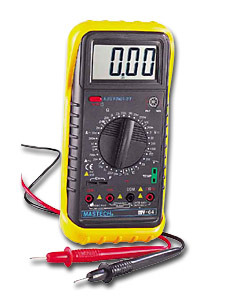
If you have one of these or similar check that you have power at the connection from the transformer if you have then the fault is within the laptop (also check the original charger it may be ok!) All the laptops i have had work without the battery being fitted to the laptop it looks more than likely that you may have a damaged power connection on the board could be costly to repair.
 0
0 -
Does the Caps lock/Num lock LEDs flash during start? If so how many times?
Can you hear fan spin when you attempt start?0 -
The old trick with dells (when they would not start up!) was to remove the battery and the power cable then hold down the power button for 20 seconds, then plug the power cable back in (leave the battery out for now!) then press the power button.
If it still does not start then it looks like the power connector in the laptop might be damaged, it's a tricky but replaceable part, if the guy at your local IT shop is good with a soldering Iron...Laters
Sol
"Have you found the secrets of the universe? Asked Zebade "I'm sure I left them here somewhere"0 -
Thanks for all the replies:
Bogtrotter, yeah tried all the wiggling bit before a new power unit was bought.
malamute, even if I had 1 I wouldn't know what to do with it.
S0litaire, tried that before,
thanks again looks like I'll take it to the local repair shop & see if I can get a quote
cheers all0 -
Larry22 have a look at this video which will give you an insight into what is required if the power jack is damaged on the board.
http://youtu.be/1i9TruBanIs0


This discussion has been closed.
Confirm your email address to Create Threads and Reply

Categories
- All Categories
- 354.4K Banking & Borrowing
- 254.4K Reduce Debt & Boost Income
- 455.4K Spending & Discounts
- 247.3K Work, Benefits & Business
- 604.1K Mortgages, Homes & Bills
- 178.4K Life & Family
- 261.6K Travel & Transport
- 1.5M Hobbies & Leisure
- 16K Discuss & Feedback
- 37.7K Read-Only Boards