We’d like to remind Forumites to please avoid political debate on the Forum.
This is to keep it a safe and useful space for MoneySaving discussions. Threads that are – or become – political in nature may be removed in line with the Forum’s rules. Thank you for your understanding.
📨 Have you signed up to the Forum's new Email Digest yet? Get a selection of trending threads sent straight to your inbox daily, weekly or monthly!
Fake AV Scareware / System Tool now targets all browsers

Mr_Oink
Posts: 1,012 Forumite
in Techie Stuff
SOURCE: http://www.theregister.co.uk/2011/03/02/rogue_av_mimics_firefox/
POSTED BECAUSE: possibly of interest to denizens of this sub forum
NOTED: It's good news for Opera users :-)
By Dan Goodin in San Francisco
Posted in Malware, 2nd March 2011 22:50 GMT
For years, ads pimping malware disguised as legitimate antivirus programs have gone to great lengths to mimic the look and feel of Microsoft's Internet Explorer browser and Windows operating system. Now Mozilla Firefox, Google Chrome, and Apple Safari are getting the same treatment.
A security researcher from Zscaler has recently uncovered a campaign that's tailored to the browser that the intended victim is using. Those with IE will see the same tired graphic depicting a Windows 7 security alert, but look what happens when the visitor is using Firefox.
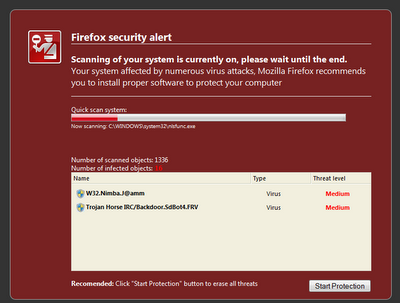
Not only does the image contain internal Firefox elements in the source code, it also spoofs the security warning the browser shows when users attempt to navigate to an address known to be malicious, said Julien Sobrier, a senior security researcher at Zscaler.
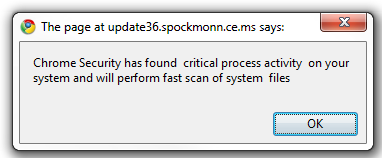
When the intended mark visits the page with Chrome, the ruse looks altogether different. The first screen shows a warning window bearing the browser's distinctive logo and the words “Chrome Security has found critical process activity on your system and will perform fast scan of system files.”
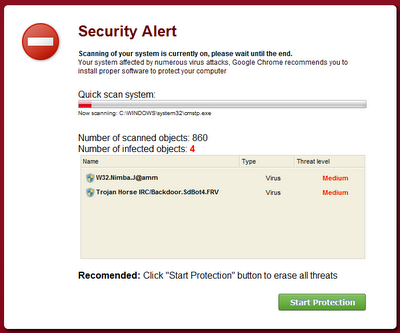
The user then sees what purports to be a Chrome window showing a virus scan.
Not to be left out, Safari is also spoofed, although with significantly less effort. The initial warning looks like this:
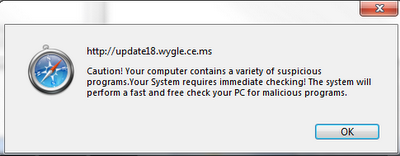
But the scan page defaults to the look and feel of IE.
The ads are an attempt to trick visitors into believing they have infections that can be cured by the software being offered in the ad. By customizing the screens to the browser, it stands to reason, malware mongers stand a better chance of succeeding.
“I've seen malicious pages tailored in the past, but they were mostly fake Flash updates or fake codec upgrades for Internet Explorer and Firefox,” Sobrier wrote in an email. “I've never seen targeted fake AV pages for so many different browsers.”
Some of the sites that redirect to the scam include columbia.faircitynews.com, https://www.troop391.org, jmvcorp.com. When successful, the redirected page pushes the file InstallInternetDefender_xxx.exe, where “xxx” is a number that changes frequently. At time of writing, it was detected as malicious by just 9.5 percent of the major (legitimate) AV packages, according to a VirusTotal scan.
POSTED BECAUSE: possibly of interest to denizens of this sub forum
NOTED: It's good news for Opera users :-)
By Dan Goodin in San Francisco
Posted in Malware, 2nd March 2011 22:50 GMT
For years, ads pimping malware disguised as legitimate antivirus programs have gone to great lengths to mimic the look and feel of Microsoft's Internet Explorer browser and Windows operating system. Now Mozilla Firefox, Google Chrome, and Apple Safari are getting the same treatment.
A security researcher from Zscaler has recently uncovered a campaign that's tailored to the browser that the intended victim is using. Those with IE will see the same tired graphic depicting a Windows 7 security alert, but look what happens when the visitor is using Firefox.
Not only does the image contain internal Firefox elements in the source code, it also spoofs the security warning the browser shows when users attempt to navigate to an address known to be malicious, said Julien Sobrier, a senior security researcher at Zscaler.
When the intended mark visits the page with Chrome, the ruse looks altogether different. The first screen shows a warning window bearing the browser's distinctive logo and the words “Chrome Security has found critical process activity on your system and will perform fast scan of system files.”
The user then sees what purports to be a Chrome window showing a virus scan.
Not to be left out, Safari is also spoofed, although with significantly less effort. The initial warning looks like this:
But the scan page defaults to the look and feel of IE.
The ads are an attempt to trick visitors into believing they have infections that can be cured by the software being offered in the ad. By customizing the screens to the browser, it stands to reason, malware mongers stand a better chance of succeeding.
“I've seen malicious pages tailored in the past, but they were mostly fake Flash updates or fake codec upgrades for Internet Explorer and Firefox,” Sobrier wrote in an email. “I've never seen targeted fake AV pages for so many different browsers.”
Some of the sites that redirect to the scam include columbia.faircitynews.com, https://www.troop391.org, jmvcorp.com. When successful, the redirected page pushes the file InstallInternetDefender_xxx.exe, where “xxx” is a number that changes frequently. At time of writing, it was detected as malicious by just 9.5 percent of the major (legitimate) AV packages, according to a VirusTotal scan.
0
Comments
-
Yes, well worth broadcasting this to warn people,
particularly so with the current "System Tool" Fake security tool mass-infections.
This is interesting & probably to be expected.
Several years ago when Firefox was the 'new kid on the block' they were a great alternative to the wobbly old IE that was being shipped out then.
But now Firefox has around 30% of worldwide usage share!
That makes it well worthwhile to write stuff targeting that particular browser, much more actively.
I prefer a less-mainstream browser, currently using Opera which is very actively developed and kept up-to-date.
Also, Plugins & Extensions, while providing useful additional functionality, can also be a double-edged sword, creating possible security risks in some cases.
But people must look VERY closely and read any pop-ups or warnings and not just blindly allow them, if in doubt do not allow them to run.
These new browser-targeted pop-ups can look like a legitimate browser warning.
The trick is not to assume that your AV & Firewall will protect you from this sort of stuff, because it probably won't, and definitely not if you give it permission to run.
Think yourself lucky that you are getting a pop-up with the option to make a decision, because there are some instances with this latest "System Tool" malware where Google Chrome gave no warnings, it installed & ran the malware just by going to the page!
So much for the sandbox, lol
0 -
Which is why I always run Chrome (and any other browser) with Sandboxie.Hannibanal wrote: »Yes, well worth broadcasting this to warn people,
particularly so with the current "System Tool" Fake security tool mass-infections.
This is interesting & probably to be expected.
Several years ago when Firefox was the 'new kid on the block' they were a great alternative to the wobbly old IE that was being shipped out then.
But now Firefox has around 30% of worldwide usage share!
That makes it well worthwhile to write stuff targeting that particular browser, much more actively.
I prefer a less-mainstream browser, currently using Opera which is very actively developed and kept up-to-date.
Also, Plugins & Extensions, while providing useful additional functionality, can also be a double-edged sword, creating possible security risks in some cases.
But people must look VERY closely and read any pop-ups or warnings and not just blindly allow them, if in doubt do not allow them to run.
These new browser-targeted pop-ups can look like a legitimate browser warning.
The trick is not to assume that your AV & Firewall will protect you from this sort of stuff, because it probably won't, and definitely not if you give it permission to run.
Think yourself lucky that you are getting a pop-up with the option to make a decision, because there are some instances with this latest "System Tool" malware where Google Chrome gave no warnings, it installed & ran the malware just by going to the page!
So much for the sandbox, lol
Although I haven't got caught this time so far, I hope and expect that Sandboxie would have trapped it and I would have been able to simply delete the sandbox with the malware in it.
The only time I venture outside Sandboxie is to get updates, etc to stick.0
This discussion has been closed.
Confirm your email address to Create Threads and Reply

Categories
- All Categories
- 355.8K Banking & Borrowing
- 254.9K Reduce Debt & Boost Income
- 456.2K Spending & Discounts
- 248.4K Work, Benefits & Business
- 606K Mortgages, Homes & Bills
- 179K Life & Family
- 263.8K Travel & Transport
- 1.5M Hobbies & Leisure
- 16.2K Discuss & Feedback
- 37.7K Read-Only Boards