Ready, steady… save!
You don’t need a chart to join in. Here are 2 ways to record your savings:
1. Cross it off
Pop a chart into your first post. Saved an amount? Cross it out! Read more »
£0.01 £0.02 £0.03
2. Write it down
Skip the chart and add updates to your first post. Read more »
“Another +£3 saved today. Go me!”
Use +£ before each new saving so it counts towards your total.
📨 Have you signed up to the Forum's new Email Digest yet? Get a selection of trending threads sent straight to your inbox daily, weekly or monthly!
[SOLVED] Problems changing US Keyboard to UK keyboard in XP

UnderPressure
Posts: 3,204 Forumite
Morning all 
We bought our 9 year old a netpad for christmas so far she has just been fiddling around the internet but today I decided to set her up a gmail address so she could email cousins overseas.
Whilst doing this I noticed the @ key actually gives you an input of " so realised when the netbook was installed the keyboard layout was not changed to English UK. I opened control panel selected regional setting then language input heres the thing though in the dropdown box there are only 2 layouts to choose from USA International and USA no UK layout to be found anywhere.
I would like it to have the UK layout as she is new to computers so think it is important for her to have the same layout as the keybopards at school so not to confuse her, I know in real terms it is only the @ button that is affected but still I would like to change it to UK.
Any ideas how I can do this? Had a quick google and did not really find anything useful. Is there some kind of UK keyboard driver I can download and install?
Thanks in advance
We bought our 9 year old a netpad for christmas so far she has just been fiddling around the internet but today I decided to set her up a gmail address so she could email cousins overseas.
Whilst doing this I noticed the @ key actually gives you an input of " so realised when the netbook was installed the keyboard layout was not changed to English UK. I opened control panel selected regional setting then language input heres the thing though in the dropdown box there are only 2 layouts to choose from USA International and USA no UK layout to be found anywhere.
I would like it to have the UK layout as she is new to computers so think it is important for her to have the same layout as the keybopards at school so not to confuse her, I know in real terms it is only the @ button that is affected but still I would like to change it to UK.
Any ideas how I can do this? Had a quick google and did not really find anything useful. Is there some kind of UK keyboard driver I can download and install?
Thanks in advance
"You can measure a man's character by the choices he makes under pressure"
Sir Winston Churchill
0
Comments
-
is it an official fully licensed install of XP?0
-
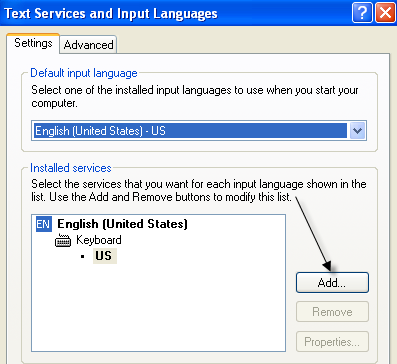
Haven't used XP in a while, but IIRC, you have to add the UK layout, there is an 'Add' button near the dropdown box isn't there?I opened control panel selected regional setting then language input heres the thing though in the dropdown box there are only 2 layouts to choose from USA International and USA no UK layout to be found anywhere.
That should bring up a list of keyboards to choose from, in which UK can be found.
I'll try to find a link to show what I mean.
EDIT: See here:
http://www.online-tech-tips.com/wp-content/uploads/2008/12/addinputlanguage.png-Scott-
“There is a computer disease that anybody who works with computers knows about. It's a very serious disease and it interferes completely with the work. The trouble with computers is that you 'play' with them!” Richard Feynman0 -
-
is it an official fully licensed install of XP?
Hello thanks for replying yes it is it is a brand new machine from Argos so it had better beHaven't used XP in a while, but IIRC, you have to add the UK layout, there is an 'Add' button near the dropdown box isn't there?
That should bring up a list of keyboards to choose from, in which UK can be found.
I'll try to find a link to show what I mean.
EDIT: See here:
http://www.online-tech-tips.com/wp-content/uploads/2008/12/addinputlanguage.png
SPOT ON
100% correct I clicked the add button and there it was along with about 1000 other layouts
Thanks for replying much appreciatedToxteth_OGrady wrote: »
All sorted now again thanks for taking the time to reply I appreciate it "You can measure a man's character by the choices he makes under pressure"Sir Winston Churchill0 -
-Scott-
“There is a computer disease that anybody who works with computers knows about. It's a very serious disease and it interferes completely with the work. The trouble with computers is that you 'play' with them!” Richard Feynman0







This discussion has been closed.
Confirm your email address to Create Threads and Reply

Categories
- All Categories
- 355.9K Banking & Borrowing
- 255K Reduce Debt & Boost Income
- 456.2K Spending & Discounts
- 248.4K Work, Benefits & Business
- 606.1K Mortgages, Homes & Bills
- 179K Life & Family
- 263.9K Travel & Transport
- 1.5M Hobbies & Leisure
- 16.2K Discuss & Feedback
- 37.7K Read-Only Boards