We’d like to remind Forumites to please avoid political debate on the Forum.
This is to keep it a safe and useful space for MoneySaving discussions. Threads that are – or become – political in nature may be removed in line with the Forum’s rules. Thank you for your understanding.
📨 Have you signed up to the Forum's new Email Digest yet? Get a selection of trending threads sent straight to your inbox daily, weekly or monthly!
The Forum now has a brand new text editor, adding a bunch of handy features to use when creating posts. Read more in our how-to guide
What Free Software do you use?
Comments
-
Spy Ware Terminator
Free 100% Real-Time Protection is included in Spyware Terminator basic version – an essential function most other applications charge you extra for. Effectively remove spyware, adware, trojans, keyloggers, home page hijackers and other malware threats
http://www.spywareterminator.com/
-0 -
BGInfo
Displays info about your pc on the background eg IP address etc
http://www.microsoft.com/technet/sysinternals/utilities/bginfo.mspx
I also use the netsh command in batch files to change my TCPIP setting when using my laptop in different places
e.g
set ip address
netsh interface ip set address "Local Area Connection" static 155.6.1.200 255.255.0.0 155.6.2.1 1
set primary dns
netsh interface ip set dns "Local Area Connection" static 195.6.80.163 register-primary
set secondary dns
netsh interface ip add dns "Local Area Connection" 195.6.80.164 index=2
If you want to set your ip and dns to dhcp then its as follows
netsh interface ip set address "Local Area Connection" dhcp
netsh interface ip set dns "Local Area Connection" dhcp
I then also use bginfo in the batch file as I have created a different background depending on which network I am using
e.g
"c:\tools\bginfo.exe" "c:\tools\network1.bgi" /timer:0
Much cheaper then buying software to do it!
Hope this helps someone Looking to raise some money0
 -
Lots of useful free software here
http://www.nirsoft.net/
The main ones I have used so far are
Recover lost password for an outlook pst file
http://www.nirsoft.net/utils/pst_password.html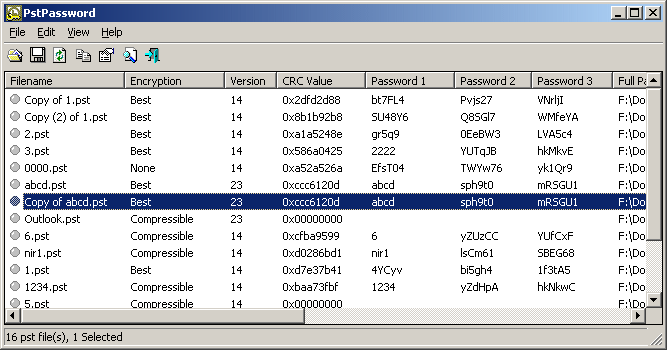
View Internet History
http://www.nirsoft.net/utils/iehv.html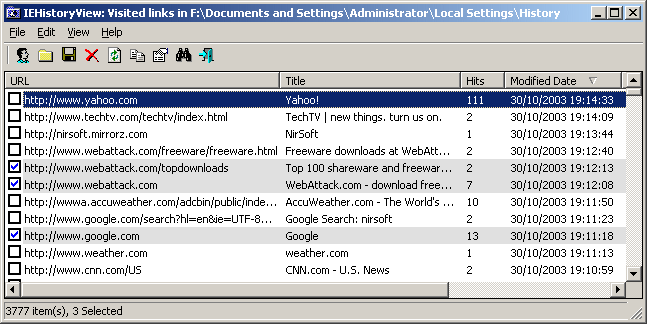
Both of these program can run straight for a USB stick or CD Rom as they don't need to be installed.
Hope these help someone Looking to raise some money0 -
http://www.team-mediaportal.com/
MediaPortal is an Open Source application ideal for turning your PC / TV into a very advanced Media Center. MediaPortal allows you to listen to your favorite music & radio, watch and store your videos and DVDs, view, schedule and record live TV as a digital video recorder and much much more. You get MediaPortal as Open Source software. This means you can help in developing MediaPortal or tweak it for your own needs with lots of innovating plugins from our great community.
http://www.ccleaner.com/
CCleaner is a freeware system optimization and privacy tool. It removes unused files from your system - allowing Windows to run faster and freeing up valuable hard disk space. It also cleans traces of your online activities such as your Internet history. But the best part is that it's fast (normally taking less than a second to run) and contains NO Spyware or Adware! 0
0 -
chuckles1066 wrote: »There are some (acknowledged by the author) display issues with XP systems so I found TClock Light which does exactly the same but is cosmetically superior:
http://homepage1.nifty.com/kazubon/tclocklight/index.html
You could also drag the taskbar so it's twice as high as standard, then it displays the date. 0 -
Ubuntu Linux https://www.ubuntu.com0
-
Vignetting Reducer for all you budding photographers out there.
darktechno, Ubuntu has already been mentioned on page 1 lol0 -
I use super converter from here http://www.erightsoft.com/Superdc.html
It converts pretty much any audio - movie file to other version.
eg. mpg - gp2
mpg - mp3
allows you to just take the sound or images from movies etc.
Hope this helps someone
Steve“Time is intended to be spent, not saved” - Alfred Wainwright0 -
Vignetting Reducer for all you budding photographers out there.
darktechno, Ubuntu has already been mentioned on page 1 lol
Doh! If any one is interested in Ubuntu the latest release comes out in 4 days time!0 -
Autostitch™
The world's first fully automatic 2D image stitcher. Capable of stitching full view panoramas without any user input whatsoever, Autostitch is a breakthrough technology for panoramic photography, VR and visualisation applications. This is the first solution to stitch any panorama completely automatically, whether 1D (horizontal) or 2D (horizontal and vertical).
Autostitch is built using cutting edge research from the AI lab at UBC, but it's incredibly simple to use! Just select a set of photos, and Autostitch does the rest: digital photos in, panoramas out.
http://www.cs.ubc.ca/~mbrown/autostitch/autostitch.html0











This discussion has been closed.
Confirm your email address to Create Threads and Reply

Categories
- All Categories
- 353.6K Banking & Borrowing
- 254.2K Reduce Debt & Boost Income
- 455.1K Spending & Discounts
- 246.7K Work, Benefits & Business
- 603.2K Mortgages, Homes & Bills
- 178.1K Life & Family
- 260.7K Travel & Transport
- 1.5M Hobbies & Leisure
- 16K Discuss & Feedback
- 37.7K Read-Only Boards