We’d like to remind Forumites to please avoid political debate on the Forum.
This is to keep it a safe and useful space for MoneySaving discussions. Threads that are – or become – political in nature may be removed in line with the Forum’s rules. Thank you for your understanding.
📨 Have you signed up to the Forum's new Email Digest yet? Get a selection of trending threads sent straight to your inbox daily, weekly or monthly!
The Forum now has a brand new text editor, adding a bunch of handy features to use when creating posts. Read more in our how-to guide
computer is infected message/pestcontrol

Bob_zodiac
Posts: 45 Forumite
in Techie Stuff
Ironically i downloaded ccleaner to speed up my pc but i seem to have a virus.
on the toolbar their is a red and white cross with a message popping up all the time say my computer is infected.
Also i have pestcontrol that's latched itself onto my computer and clickng remove on the add/remove menu does nothing.
help.
on the toolbar their is a red and white cross with a message popping up all the time say my computer is infected.
Also i have pestcontrol that's latched itself onto my computer and clickng remove on the add/remove menu does nothing.
help.
0
Comments
-
follow the first 4 threads here.. http://forums.moneysavingexpert.com/showthread.html?t=133269
.. any further issues post backEver stop to think and forget to start again?0 -
I used the ccleaner which started this mess in the first place.
I don't trust any of these free download sites.
Can someone explain how to remove this cross from the toolbar?
thanks.0 -
i use ccleaner / avast / kerio / spybot all which are free and do as good a job as any that i have paid for.
if you don't want to use the methods suggested in the thread above then you can either format your hard disk or take it to pc world.Ever stop to think and forget to start again?0 -
Sorry to hear about your troubles but ignoring advice is not the way to fix it.Bob_zodiac wrote:I used the ccleaner which started this mess in the first place.
I don't trust any of these free download sites.
Can someone explain how to remove this cross from the toolbar?
thanks.
I believe you are seeing this (or something like it)....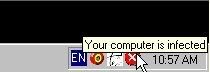
If so you then you have been CORRECTLY recommended to take the steps in the first 4 posts to the thread referred to in post #2.
It took several people from this site several hours to put that thread together to help people in trouble.
I can personally assure you that NONE of the scanners or other tools listed there are in any way bad for your computer. Quite the reverse.
You have asked for help to fix your touble ... that is the first stage.
Incidentally, Ccleaner is also NOT a bad program and would NOT have been the cause of your infection, despite what you might believe.
Take the advice or not. Your call.
PCH0 -
Hi,
I can personally vouch for PCHELPMAN.
He really knows his stuff and gives valuable, sound advice free!!!!
Jo0 -
Go to http://siri.geekstogo.com/SmitfraudFix.php, download the app and follow the instructions on the website. I used this recently to delete a the same problem from a computer in the office.
It is a good tool to keep in case you unfortunately need it again.0 -
The Smitfraud infection you have is usually installed via a codec pack in disguise which the victim is tricked into installing to enable a media file to be viewed. The media files are usually adult in nature so if this cap fits you, I suggest you stick to the paperbacks.Bob_zodiac wrote:I used the ccleaner which started this mess in the first place.
I don't trust any of these free download sites.
Can someone explain how to remove this cross from the toolbar?
thanks.
It certainly has nothing to with installing CrapCleaner.0 -
Bob_zodiac wrote:I used the ccleaner which started this mess in the first place.
I don't trust any of these free download sites.
Can someone explain how to remove this cross from the toolbar?
thanks.
As others have said it's not cc cleaner, unless it was downloaded from an iffy site & trojan had been added to program.
freeware can be as good or better than programes you pay for, don't be put off because it's free.
I agree the advice on this forum is very good but if you wan't to check else where go to http://www.majorgeeks.com/0





This discussion has been closed.
Confirm your email address to Create Threads and Reply

Categories
- All Categories
- 353.5K Banking & Borrowing
- 254.1K Reduce Debt & Boost Income
- 455K Spending & Discounts
- 246.6K Work, Benefits & Business
- 602.9K Mortgages, Homes & Bills
- 178.1K Life & Family
- 260.6K Travel & Transport
- 1.5M Hobbies & Leisure
- 16K Discuss & Feedback
- 37.7K Read-Only Boards