We’d like to remind Forumites to please avoid political debate on the Forum.
This is to keep it a safe and useful space for MoneySaving discussions. Threads that are – or become – political in nature may be removed in line with the Forum’s rules. Thank you for your understanding.
📨 Have you signed up to the Forum's new Email Digest yet? Get a selection of trending threads sent straight to your inbox daily, weekly or monthly!
The Forum now has a brand new text editor, adding a bunch of handy features to use when creating posts. Read more in our how-to guide
Spring Cleaning!! (Computer)

Reuben_3
Posts: 23 Forumite
in Techie Stuff
I've just noticed I'm down to 2GB's harddrive space on my laptop so was going to use CCleaner to tidy things up. Does this delete old browsing history automatically? And should it be run regularly ie weekly?
I'm also about to deinstall Norton Antivirus/Firewall and replace it with (probably):-
- AVG Antivirus
- ZoneAlarm Firewall
- Ewido
- Spyware detector maybe Spybot S&D
Are there any compatability issues with these and CCleaner, and does it matter which order I do this in?
I'm also about to deinstall Norton Antivirus/Firewall and replace it with (probably):-
- AVG Antivirus
- ZoneAlarm Firewall
- Ewido
- Spyware detector maybe Spybot S&D
Are there any compatability issues with these and CCleaner, and does it matter which order I do this in?
0
Comments
-
yes, you can run it at bootup if you wish.
no, but if you install too many resident anti-spyware programs, your pc's performance might slow down a bit.Ever get the feeling you are wasting your time? :rolleyes:0 -
you can uncheck the box in Ccleaner that would delete browser history so that it doesn't.
and it's well worth running it btw, the other day I cleaned out my gf's comp for the first time in a couple months and freed up almost 8GB.
Defrag as well (regularly ), keep your HDD nice and clean and happy
  "If you really want to hurt your parents and you don't have nerve enough to be homosexual, the least you can do is go into the arts."0
 -
I clean with ccleaner everyday when I am finished with the PC.
gary0 -
Defrag? er how!? Sorry, never defragged or backed up etc.
Should I CClean before new Security installation or is it best to do it afterward?0 -
right click on your c drive in explorer, properties, tools, defag
before.
backup..get this while you can..
http://forums.moneysavingexpert.com/showthread.html?t=274307Ever get the feeling you are wasting your time? :rolleyes:0 -
Whats cc cleaner - is this the disk clean up or is this another program altogether?Lightbulb moment 10-06-06
Total debt £36,996.70 June 2006
Total debt approx £33,000 Oct 2006
Jan 07....to be worked out but may have gone up GULP :mad: :eek:
DFD March 2011
DFW Nerd 111
19 jan 23 feb 5 weeks:( - grocery challenge £2500 -
-
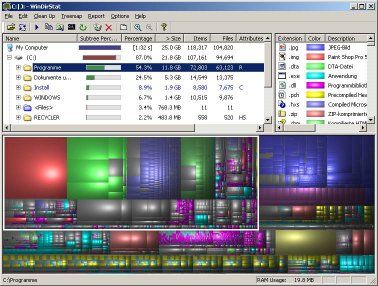
I find Windirstat incredibly useful for discovering where space is being taken up by unnecessary stuff.
You get a visual representation of your drive like this where you can just click on a block to find out what it is.
Of course it goes without saying to be very careful when deleting. It only tells you what's taken up space, not what you should delete. If in doubt only remove stuff from your My Documents section0 -
Thanks again for all the advice.....where would I be without this site!!
Will defrag & everything else over the weekend. That Windirstat thing looks fascinating - great to be able to 'visualise' my harddrive contents. Presumably it can be used along with CCleaner etc.0





This discussion has been closed.
Confirm your email address to Create Threads and Reply

Categories
- All Categories
- 353.5K Banking & Borrowing
- 254.2K Reduce Debt & Boost Income
- 455.1K Spending & Discounts
- 246.6K Work, Benefits & Business
- 603K Mortgages, Homes & Bills
- 178.1K Life & Family
- 260.6K Travel & Transport
- 1.5M Hobbies & Leisure
- 16K Discuss & Feedback
- 37.7K Read-Only Boards