We’d like to remind Forumites to please avoid political debate on the Forum.
This is to keep it a safe and useful space for MoneySaving discussions. Threads that are – or become – political in nature may be removed in line with the Forum’s rules. Thank you for your understanding.
📨 Have you signed up to the Forum's new Email Digest yet? Get a selection of trending threads sent straight to your inbox daily, weekly or monthly!
The Forum now has a brand new text editor, adding a bunch of handy features to use when creating posts. Read more in our how-to guide
Help!! USB port problem.

onejontwo
Posts: 1,089 Forumite


in Techie Stuff
Help!! My printer has just packed up (epson stylus DX 4450) I can get it to print after scanning an item so I know the printer is able to print, but in device manager under Universal Bus Controllers it shows 3 yellow exclamation marks for:-
SIS 7001 PCI to USB OPEN HOST CONTROLLER
SIS 7001 PCI to USB OPEN HOST CONTROLLER
SIS PCI to USB ENHANCED HOST CONTROLLER
As the printer is connected by USB is this where the fault lies and what do I do to fix it?
I've tried the trouble shooting but I'm having no luck.
Thanks in anticipation.
SIS 7001 PCI to USB OPEN HOST CONTROLLER
SIS 7001 PCI to USB OPEN HOST CONTROLLER
SIS PCI to USB ENHANCED HOST CONTROLLER
As the printer is connected by USB is this where the fault lies and what do I do to fix it?
I've tried the trouble shooting but I'm having no luck.
Thanks in anticipation.
0
Comments
-
The problem is at the PC end, not the printer.
In device manager you could open the settings for each of the entries click on the driver tab, and either update or rollback the driver - that may do the trick.
If that doesn't work - do you have a system disc with drivers on it for the machine ? - you may need to re-install the USB drivers. If you don't have a disc you may be able to download them from the manufacturers website.0 -
Or even try uninstalling those drivers and rebooting .
jje0 -
How could I just lose those drivers if that is the fault?0
-
I've tried un installing the drivers and re booting also rolling back the drivers but still showing an exclamation mark. Also each exclamation mark shows this when clicking on it :-
A driver (service) for this device has been disabled. An alternate driver may be providing this functionality. (Code 32)
and
The drivers for this device are not installed. (Code 28)
Would this be due to a virus or windows update or something else?0 -
Anybody please before I adjust it with a sledge hammer!!!!!!0
-
Right where's that sledge hammer............................0
-
Try Fixit here --> Microsoft Fixit4.8kWp 12x400W Longhi 9.6 kWh battery Giv-hy 5.0 Inverter, WSW facing Essex . Aint no sunshine ☀️ Octopus gas fixed dec 24 @ 5.74 tracker again+ Octopus Intelligent Flux leccy
CEC Email energyclub@moneysavingexpert.com0 -
Thanks , tried it but it seems to be just maintenance stuff. I really need to renew/ install the disabled drivers somehow. I've tried system restore and reinstalling from the supplied disc I got with the PC, but it seems hopeless.0
-
http://s1233.photobucket.com/albums/ff398/onejontwo/th_Printertroubleshooter.jpg?t=1286392370
Does this help??[IMG][/img]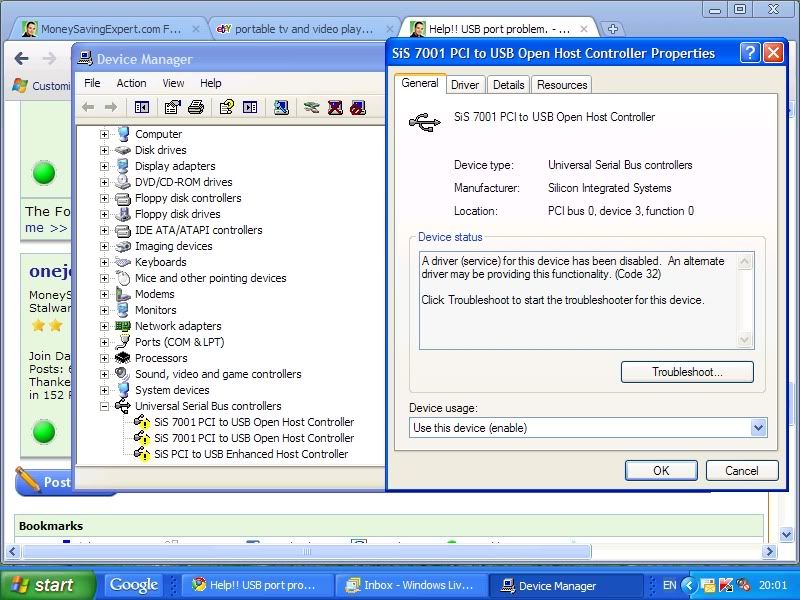 0
0 -
Any computer savvy techies out there?? I'm sure it's simple it's just knowing the right buttons to press.
Please don't make me resort to PC World!!0





This discussion has been closed.
Confirm your email address to Create Threads and Reply

Categories
- All Categories
- 353.5K Banking & Borrowing
- 254.2K Reduce Debt & Boost Income
- 455K Spending & Discounts
- 246.6K Work, Benefits & Business
- 602.9K Mortgages, Homes & Bills
- 178.1K Life & Family
- 260.6K Travel & Transport
- 1.5M Hobbies & Leisure
- 16K Discuss & Feedback
- 37.7K Read-Only Boards