We’d like to remind Forumites to please avoid political debate on the Forum.
This is to keep it a safe and useful space for MoneySaving discussions. Threads that are – or become – political in nature may be removed in line with the Forum’s rules. Thank you for your understanding.
📨 Have you signed up to the Forum's new Email Digest yet? Get a selection of trending threads sent straight to your inbox daily, weekly or monthly!
The Forum now has a brand new text editor, adding a bunch of handy features to use when creating posts. Read more in our how-to guide
Help, new mobile phone has lost my numbers?

puddy
Posts: 12,709 Forumite
in Techie Stuff
I had a new phone delivered today after having the same phone for years.
The new one is the nokia e63, the old one is the nokia 6233.
I had a sim only in the old one with loads of messages and numbers on it. I had no memory card (or at least when I looked today there isnt one). I have been having trouble with the memory for quite a few months now and have to delete a load of messages before it will let me send anymore.
So have transferred the sim to the new phone and it hasnt transferred any of the numbers or messages to the new phone?
So I turned on the old phone but couldnt get the sim back out the new phone to put in the old phone. Text messages are still there on the old phone, but when I go into 'contacts', there are no numbers and it says 'no sim card memory'.
So if the numbers are not on the sim card, but not in the old phone either, where are they?? I havent got any of this stuff written down
Trouble is I cant get the sim back out the new phone now to put into the old phone
The new one is the nokia e63, the old one is the nokia 6233.
I had a sim only in the old one with loads of messages and numbers on it. I had no memory card (or at least when I looked today there isnt one). I have been having trouble with the memory for quite a few months now and have to delete a load of messages before it will let me send anymore.
So have transferred the sim to the new phone and it hasnt transferred any of the numbers or messages to the new phone?
So I turned on the old phone but couldnt get the sim back out the new phone to put in the old phone. Text messages are still there on the old phone, but when I go into 'contacts', there are no numbers and it says 'no sim card memory'.
So if the numbers are not on the sim card, but not in the old phone either, where are they?? I havent got any of this stuff written down
Trouble is I cant get the sim back out the new phone now to put into the old phone
0
Comments
-
There is usually a setting to copy between phone memory SIM memory, also can be options to display only phone memory numbers, only SIM numbers or both in the settings depending on how old your SIM is and how many numbers might take more than one attempt to get them all accross.
Alternatively download the appropriate software and hook your phone up to your PC, if you go down that route either while transferring numbers or afterwards you have the added benefit of backing your numbers up somewhere in case your phone is ever lost/stolen/destroyed.
this might help getting the SIM out in the first instance:
http://forums.moneysavingexpert.com/archive/index.php/t-2360791.html
alternatively i believe the expression is RTFM:
http://nds1.nokia.com/phones/files/guides/Nokia_E63-1_UG_en.pdf0 -
hmm, yes, there are no catches on the sim section in the new phone, its just so hard to get it out, you cant grab hold of it to pull it out
well, i have just gone into settings and connections and then APN control, it comes up first saying 'reading sim card content', then it says '
'connection restrictions inactive'
then it says no access point names, press options to add new access point name, so when I do that it says 'activate restrictions' and Im too scared to press the button because I dont know what it will do...0 -
Try reading the manuals for both phones?0
-
ive got the manual here, it doesnt say anything about it0
-
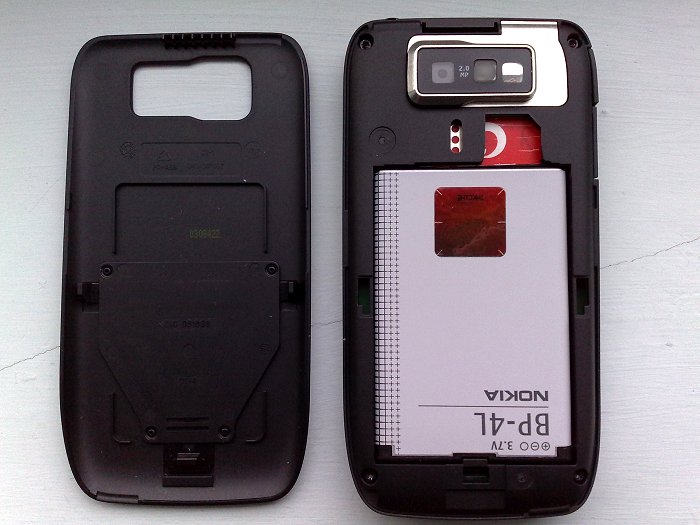
to get the sim card out just put your finger on the sim card (you can see the red sim card in the picture) and pull towards you while maintaining the grip on the sim card. (remember to take out the battery)
 0
0 -
i was doing that, it simply wasnt sliding out. boyfriend now home from work and he took it out. we tried blue tooth, but it wouldnt transfer the contacts. we have now put the sim back in the old phone, put the contacts on here (which is odd because when i put the old phone on without the sim, they were not there),then put the sim back into the new phone and we seem to have found 'sim contacts' but we dont know how to marry them up just into general contacts,
to be honest im not that impressed with this phone0




This discussion has been closed.
Confirm your email address to Create Threads and Reply

Categories
- All Categories
- 354.2K Banking & Borrowing
- 254.3K Reduce Debt & Boost Income
- 455.3K Spending & Discounts
- 247.2K Work, Benefits & Business
- 603.8K Mortgages, Homes & Bills
- 178.4K Life & Family
- 261.3K Travel & Transport
- 1.5M Hobbies & Leisure
- 16.1K Discuss & Feedback
- 37.7K Read-Only Boards