We’d like to remind Forumites to please avoid political debate on the Forum.
This is to keep it a safe and useful space for MoneySaving discussions. Threads that are – or become – political in nature may be removed in line with the Forum’s rules. Thank you for your understanding.
📨 Have you signed up to the Forum's new Email Digest yet? Get a selection of trending threads sent straight to your inbox daily, weekly or monthly!
The Forum now has a brand new text editor, adding a bunch of handy features to use when creating posts. Read more in our how-to guide
OUTLOOK will not open

Dick_Turpin99
Posts: 394 Forumite
in Techie Stuff
All of a sudden this morning when I try to open Outlook (on Win7) it opens and closes immediately and gives the following message. To say this is a disaster is putting it lightly!
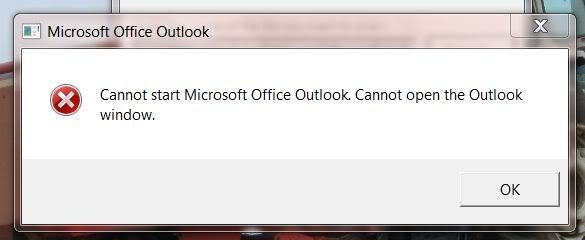
What to do next?
What to do next?
0
Comments
-
Always worth trying Google: http://www.techforlunch.com/cannot-start-microsoft-office-outlook-cannot-open-the-outlook-window/0
-
Thanks, will try that next!....I.T. guy is just running the error check on the Outlook files0
-
As a alternative, you could download and install thunderbird for windows, then you could locate your outlook *pst files on your local machine and import them into thunderbird. At least then you have a way of reading any archived emails.
Thunderbird for windows
http://www.mozillamessaging.com/en-GB/thunderbird/
Importing pst files
http://kb.mozillazine.org/Import_.pst_files
You could even setup your email account in Thunderbird and have it there as an alternative until your fix outlook.0 -
IT Guy on call-out at 6.23am?No free lunch, and no free laptop
 0
0 -
-
!!!!!!_Turpin99 wrote: »Maybe 6:23am with you in UK, but its 10:23am with me :j
I thought !!!!!! Turpin was last seen hanging around in in York? Which isn't 4 hours ahead of the rest of the UK No free lunch, and no free laptop0
 -
All sorted now, the IT king ran his repair thing on Outlook (where it checks in 8 stages?) he did it twice and when he hit the 'fix' button the second time Outlook opened immediately.
Anyway I think this was a result of the computer's batteries going flat with outlook running.
But it brought something home to me and that was the need to back-up a copy of all my mails on a seperate hard-drive, I guess the easiest way is through the export wizard, exporting as a .pst file selecting all the files and saving on a seperate drive - is it that simple?
All's well that ends up alright!0 -
-
!!!!!!_Turpin99 wrote: »All sorted now, the IT king ran his repair thing on Outlook (where it checks in 8 stages?) he did it twice and when he hit the 'fix' button the second time Outlook opened immediately.
Anyway I think this was a result of the computer's batteries going flat with outlook running.
But it brought something home to me and that was the need to back-up a copy of all my mails on a seperate hard-drive, I guess the easiest way is through the export wizard, exporting as a .pst file selecting all the files and saving on a seperate drive - is it that simple?
All's well that ends up alright!
Yup it is that simple as long as you are on Outlook 2003 or above.If my post helped you in anyway, please hit the "Thanks" button! Please note any advice I give is followed at your own risk!0





This discussion has been closed.
Confirm your email address to Create Threads and Reply

Categories
- All Categories
- 353.5K Banking & Borrowing
- 254.1K Reduce Debt & Boost Income
- 455K Spending & Discounts
- 246.6K Work, Benefits & Business
- 602.9K Mortgages, Homes & Bills
- 178.1K Life & Family
- 260.6K Travel & Transport
- 1.5M Hobbies & Leisure
- 16K Discuss & Feedback
- 37.7K Read-Only Boards