We’d like to remind Forumites to please avoid political debate on the Forum.
This is to keep it a safe and useful space for MoneySaving discussions. Threads that are – or become – political in nature may be removed in line with the Forum’s rules. Thank you for your understanding.
📨 Have you signed up to the Forum's new Email Digest yet? Get a selection of trending threads sent straight to your inbox daily, weekly or monthly!
The Forum now has a brand new text editor, adding a bunch of handy features to use when creating posts. Read more in our how-to guide
Computer upgrade advice

Shrimply
Posts: 869 Forumite


in Techie Stuff
Hi, I built my computer about a year ago, with some help on a different forum, its nothing special but it works. I tried to go for quality over performance, I think.
I've been kinda thinking about upgrading/adding a few parts, to save me having to list them all, I'll just do this
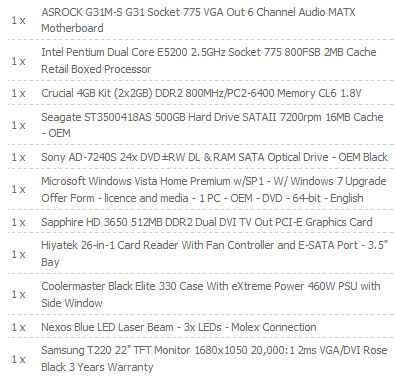
So I have had a few thoughts, firstly I thinking about fitting a second drive to use as back up, I guessing that for this purpose it doesn't have to be anything special, Anyone got any advice, and does it really matter, I'm not looking to spend too much.
I'm also looking at fitting a second case fan at the front, I've been told that xilence are some of the best but noise wise the CoolerMaster one I've got seems pretty good and they seem to be a bit cheaper.
Also the system is pretty noisy and investigation suggests this is solely down to the Graphics card, which kinda sucks, I've tried cleaning the fan and stuff but it makes little difference. Is this common or is my card just rubbish. Performance wise I don't need any more, and I'd rather not have to replace it but I would like things to be a little quieter.
Finally I've been trying to figure out what to do with the wireless, basically since the system was built I've been using an old wireless card, which works but doesn't have signed drivers, its not a big issue I get around it by hibernating the system most of the time, but it still seems to require disconnection and reconnecting to the network a few times once I resume from hibernate So I can't really decide what to do here, apparently a card is a better option than a usb device. But cards seem to get a lot more expensive for the same thing as a USB one would, and I'm worried if I buy a cheap unbranded card I'll have the same driver issues as I have now, but I dont really want to spend £20 or so to replace something that for the most part works.
And I don't really need an n type adapter as none of my other devices use it but I'm not sure if its just as well to buy a decent one now,
And also my motherboard has limited PCI slots so i was looking at maybe a PCI Express 1x card, but I'm aware that if I ever end up needing USB 3.0 on this machine then I'd need the slot for that.
So yeah any help is appreciated
Thanks
I've been kinda thinking about upgrading/adding a few parts, to save me having to list them all, I'll just do this
So I have had a few thoughts, firstly I thinking about fitting a second drive to use as back up, I guessing that for this purpose it doesn't have to be anything special, Anyone got any advice, and does it really matter, I'm not looking to spend too much.
I'm also looking at fitting a second case fan at the front, I've been told that xilence are some of the best but noise wise the CoolerMaster one I've got seems pretty good and they seem to be a bit cheaper.
Also the system is pretty noisy and investigation suggests this is solely down to the Graphics card, which kinda sucks, I've tried cleaning the fan and stuff but it makes little difference. Is this common or is my card just rubbish. Performance wise I don't need any more, and I'd rather not have to replace it but I would like things to be a little quieter.
Finally I've been trying to figure out what to do with the wireless, basically since the system was built I've been using an old wireless card, which works but doesn't have signed drivers, its not a big issue I get around it by hibernating the system most of the time, but it still seems to require disconnection and reconnecting to the network a few times once I resume from hibernate So I can't really decide what to do here, apparently a card is a better option than a usb device. But cards seem to get a lot more expensive for the same thing as a USB one would, and I'm worried if I buy a cheap unbranded card I'll have the same driver issues as I have now, but I dont really want to spend £20 or so to replace something that for the most part works.
And I don't really need an n type adapter as none of my other devices use it but I'm not sure if its just as well to buy a decent one now,
And also my motherboard has limited PCI slots so i was looking at maybe a PCI Express 1x card, but I'm aware that if I ever end up needing USB 3.0 on this machine then I'd need the slot for that.
So yeah any help is appreciated
Thanks
0
Comments
-
Oil the noisy fan -not wd40 but a light oil eg 3-in-1 household oil, you could use ink syringe if you have one to just inject oil through the sticker.
I just got a USB wireless adapter from ebay for £4.99 del. It works fine streaming movies into my media player. Why use up a pci slot as you yourself have wondered ??
Why a case fan? What temp is your cpu and h/drive at ?? A case fan would only make more noise.
This h/d isn't bad 1TB- only £43 del. http://www.ebuyer.com/product/173804?utm_source=google&utm_medium=products0 -
Thanks
Would oil really work, its been noisy since it was brand new, I figured it was more of a manufacture problem, than a lack of lubrication.
Well as I say I'd kindof been led to believe that a card was more reliable than a USB stick and also it would be more convenient to have it built in I suppose.
I always meant to add a second case fan, and surely no matter what my temps are it wouldn't do any harm for them to be lower, noise wise, as I say my case fan at the minute produces very little noise.
Hard drive wise I don't think I need anything bigger than 500GB, which can be got for around £30, is it worth paying more for a faster drive, when its not going to be accessed that regular or used continuously.
Thanks for the help.0 -
Any other thoughts?
Help is appreciated0 -
Well in depends, not too much, the system is only a year old and was around £480, so not a huge amount.
Enough to get free delivery on Ebuyer though 0
0 -
So how about just sticking another 2GB RAM in it and upgrading the OS to WIN 7 or simply leaving it as is and investing your money in an external hard drive?
Front Case fan wise I don't think you need it. Unless you've overclocked your CPU it runs pretty cool anyway.0 -
Thanks, well Its already running windows 7, the disk I got included an upgrade.
Ram wise, I think the 4GB's is enough, the motherboard can take up to 8GB but only has two slots , so I'd have to buy a 4GB stick and its probably pretty pricey and seems a waste of the ram that's in there.
I already have a 500GB WD external hard drive, I was looking at an internal as back up because I figured it would be better to have another back up and am more likely to back up to that regularly compared to having to attach the external hard drive which gets done less often than it probably should.
Oh OK, fan wise as I say it was just suggested I fit one when I build the system, but I was trying to spend as little as possible, and I figured it wouldn't do any harm.
Thank you0 -
someone should have strongly advised you against buying the OEM edition of windows -had you bought the RETAIL one you wouldn't now need to but another copy when you next build a PC or upgrade the one you have....
the samsung F3 linked to earlier is by some margin the fastest drive on the market (non-SSD).... worth thinking about putting your OS onto that drive.
go USB on the wireless card if you like but i tend to advise against it as you don;t really want to be throttling your internet connection/local data transfers onto your USB bandwidth, putting it in a PCI slot will allow faster local transfers, lower latency and not be afffected by anything else you're doing with your USB bandwidth. 0
0 -
Well the OEM doesn't really bother me to be honest, it was the best price at the time and included an upgrade to windows 7, I was quite happy. And I knew exactly what I was doing when I chose it over a retail version.
Although I do wish someone had had the common sense to tell me to use windows 7 beta until it was released and then buy the student revision, *sigh*.
I don't really intend to upgrade the actual system any time soon, and while I realise switching the operating system over to a faster drive might be sensible, I'm quite happy with the speed of everything and I really am not interested in reinstalling everything right now.
I've never really heard much about samsung drives, but its a good price and fast is it good quality? I guess I could buy it now for storage and transfer the OS over to it in the future if I can ever be bothered.
Ooh USB bandwidth is a new one to me, so no matter how many usb ports you have, everything is somehow limited, some googling required, but thanks for the reasoning behind PCI over USB. 0 -
Ooh USB bandwidth is a new one to me, so no matter how many usb ports you have, everything is somehow limited, some googling required, but thanks for the reasoning behind PCI over USB.
here is a fair place to start
http://en.wikipedia.org/wiki/Southbridge_%28computing%29
useful little diagram on the right hand side 0
0

This discussion has been closed.
Confirm your email address to Create Threads and Reply

Categories
- All Categories
- 353.5K Banking & Borrowing
- 254.2K Reduce Debt & Boost Income
- 455K Spending & Discounts
- 246.6K Work, Benefits & Business
- 602.9K Mortgages, Homes & Bills
- 178.1K Life & Family
- 260.6K Travel & Transport
- 1.5M Hobbies & Leisure
- 16K Discuss & Feedback
- 37.7K Read-Only Boards