We’d like to remind Forumites to please avoid political debate on the Forum.
This is to keep it a safe and useful space for MoneySaving discussions. Threads that are – or become – political in nature may be removed in line with the Forum’s rules. Thank you for your understanding.
📨 Have you signed up to the Forum's new Email Digest yet? Get a selection of trending threads sent straight to your inbox daily, weekly or monthly!
The Forum now has a brand new text editor, adding a bunch of handy features to use when creating posts. Read more in our how-to guide
B&B free wifi.
![[Deleted User]](https://us-noi.v-cdn.net/6031891/uploads/defaultavatar/nFA7H6UNOO0N5.jpg)
[Deleted User]
Posts: 0 Newbie




Hi,
I take off now and again, Oban, Arran, Edinburgh, Stirling, Wick, Thurso, with my little Samsung R710 lappy, Vista Home Premium.
Now, strange thing, in some of the b&b's offering free wifi/internet access wee lappy works fine, but in some, it will connect to the internet, but not load web pages, so anybody any idea why.
Thanks, for now.
I take off now and again, Oban, Arran, Edinburgh, Stirling, Wick, Thurso, with my little Samsung R710 lappy, Vista Home Premium.
Now, strange thing, in some of the b&b's offering free wifi/internet access wee lappy works fine, but in some, it will connect to the internet, but not load web pages, so anybody any idea why.
Thanks, for now.
0
Comments
-
The only vaguely similar problem I've had with this sort of thing is when I could connect to the router, but the router itself wasn't connected to the internet. So this shows as a good wireless connection, but you can't actually do anything with browser, email, etc.
Did the B&B owner(s) offer any explanation of why you were having problems?0 -
Hi,
thanks for the reply.
Well the hotel in Oban worked fine, wee card in room with password,
Arran worked after boss man adjusted some settings,
like this, though these are not the actual ones,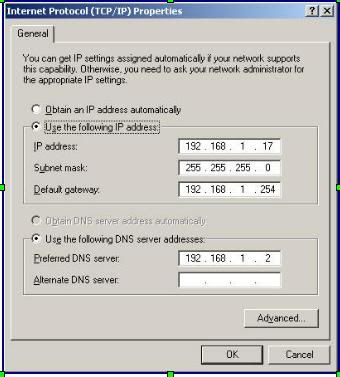
though can't remember what he did. I was there for hogmanay, so....
Edinburgh, and Stirling internet access, but no pages, also was in Wick, same thing in B&B, even took lappy to Wetherspoons in Wick, again internet access, but no pages, strange.
Thanks.
Edit: the one in Wick brought a wee gadget up to a plug outside the room, and I was able to connect ok that night, but next morning no joy.0 -
[Deleted User] wrote:Arran worked after boss man adjusted some settings,
like this, though these are not the actual ones,
Normally the wireless router should have a DHCP server running and you should leave the settings set to automatically for both (IP and DNS). This way it should work everywhere. Should...:)0

This discussion has been closed.
Confirm your email address to Create Threads and Reply

Categories
- All Categories
- 353.5K Banking & Borrowing
- 254.2K Reduce Debt & Boost Income
- 455.1K Spending & Discounts
- 246.6K Work, Benefits & Business
- 603K Mortgages, Homes & Bills
- 178.1K Life & Family
- 260.6K Travel & Transport
- 1.5M Hobbies & Leisure
- 16K Discuss & Feedback
- 37.7K Read-Only Boards