We’d like to remind Forumites to please avoid political debate on the Forum.
This is to keep it a safe and useful space for MoneySaving discussions. Threads that are – or become – political in nature may be removed in line with the Forum’s rules. Thank you for your understanding.
📨 Have you signed up to the Forum's new Email Digest yet? Get a selection of trending threads sent straight to your inbox daily, weekly or monthly!
The Forum now has a brand new text editor, adding a bunch of handy features to use when creating posts. Read more in our how-to guide
Running Dual Monitors
Comments
-
Yes I want extended desktop. In the OP I gave the spec of the current on board card. I want to know what I need to buy to do extended desktop.
Do I need another card (half height, seems they are a bit rare) or just a spliter0 -
Yes I want extended desktop. In the OP I gave the spec of the current on board card. I want to know what I need to buy to do extended desktop.
Do I need another card (half height, seems they are a bit rare) or just a spliter
In that case you can suffice with a VGA splitter
All you would do would be buying a VGA splitter, hook up the monitors then setup the extended desktop under desktop > properties. You would identify the monitors left and right then tick the box on monitor two so it says "extend my windows desktop...."
This is similar to what you need.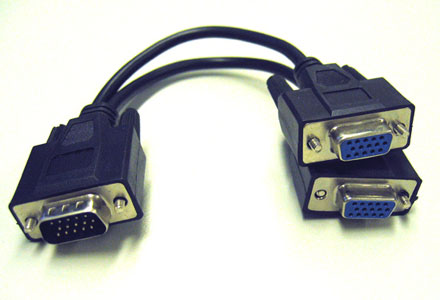 Owner of andrewhope.co.uk, hate cars and love them
Working towards DFD
HSBC Credit Card - £2700 / £7500
AA Loans - (cleared £9700)0 -
Would this do the job http://www.maplin.co.uk/Module.aspx?ModuleNo=338960
with http://www.maplin.co.uk/Module.aspx?ModuleNo=2184070 -
In that case you can suffice with a VGA splitter
All you would do would be buying a VGA splitter, hook up the monitors then setup the extended desktop under desktop > properties. You would identify the monitors left and right then tick the box on monitor two so it says "extend my windows desktop...."
This is similar to what you need.
Thanks can you confirm with this I will be able to have outlook running on one screen and word on the other (for example).
Sorry this has got so complicated we have been cross posting.0 -
Yes it can do that...0
-
I'm not 100% sure that card supports it. Providing the VGA can be seperated on a sort of cable you could use those backplates. Maplins website seems confusing but it does seem to be capable of this. I'll have to look into it further to be honest
I have a 8400GS 512mb (PCI-X) and it's Full Height, I don't actually know if they make half-height ones in that version. I'll look into it more
Regarding your two monitors. If you use an extended Desktop yes you can, all you do is drag the other application to the other screen. HOWEVER, you CANNOT maximise it to my knowledge (by clicking the maximise icon) you'd have to resize it manually. Double clicking on it or maximising it would put it on your primary screen, you will need to resize it manually.Owner of andrewhope.co.uk, hate cars and love them
Working towards DFD
HSBC Credit Card - £2700 / £7500
AA Loans - (cleared £9700)0 -
Whats the chipset? Intel?0
-
OK I think I will buy the splitter and see what if that does what I want.0
-
Regarding your two monitors. If you use an extended Desktop yes you can, all you do is drag the other application to the other screen. HOWEVER, you CANNOT maximise it to my knowledge (by clicking the maximise icon) you'd have to resize it manually. Double clicking on it or maximising it would put it on your primary screen, you will need to resize it manually.
I use a monitor attached to the docking station for my work Dell laptop with the Dell's screen as the secondary display of the extended desktop and dragging then maximising works fine. The maximised application stays on the secondary screen.There's love in this world for everyone. Every rascal and son of a gun.
It's for the many and not the few. Be sure it's out there looking for you.
In every town, in every state. In every house and every gate.
Wth every precious smile you make. And every act of kindness.
Micheal Marra, 1952 - 20120 -
A VGA splitter will merely duplicate the image onto two monitors. Its just a cable, it has no electronics.
To do what you want, if your motherboards on board graphics do not support dual monitors, then you need a graphics card. Here is one in AGP which is low profile - http://www.ebuyer.com/product/169448 And the spec here - http://uk.asus.com/product.aspx?P_ID=gEIQgiuZVAUvuIJa&templete=2
That card can drive two monitors itself so you could disable the onboard video in BIOS once that was installed.0






This discussion has been closed.
Confirm your email address to Create Threads and Reply

Categories
- All Categories
- 354K Banking & Borrowing
- 254.3K Reduce Debt & Boost Income
- 455.3K Spending & Discounts
- 247.1K Work, Benefits & Business
- 603.7K Mortgages, Homes & Bills
- 178.3K Life & Family
- 261.2K Travel & Transport
- 1.5M Hobbies & Leisure
- 16.1K Discuss & Feedback
- 37.7K Read-Only Boards