We’d like to remind Forumites to please avoid political debate on the Forum.
This is to keep it a safe and useful space for MoneySaving discussions. Threads that are – or become – political in nature may be removed in line with the Forum’s rules. Thank you for your understanding.
📨 Have you signed up to the Forum's new Email Digest yet? Get a selection of trending threads sent straight to your inbox daily, weekly or monthly!
The Forum now has a brand new text editor, adding a bunch of handy features to use when creating posts. Read more in our how-to guide
Folders in Windows7

Iconic
Posts: 1,021 Forumite


in Techie Stuff
I have just upgraded from XP to Windows7 and am having trouble understanding the different folder set up.
AppData and Roaming folders appear to be extensions of the XP Program Files folder but I find it almost impossible to get to the Roaming folders easily!
For instance I have to copy and paste this 'C:\Users\Tom\AppData\Roaming' to get to it.
If I use the tree in Explorer I can get to 'Tom' but there is no AppData in Tom's folder!
AppData and Roaming folders appear to be extensions of the XP Program Files folder but I find it almost impossible to get to the Roaming folders easily!
For instance I have to copy and paste this 'C:\Users\Tom\AppData\Roaming' to get to it.
If I use the tree in Explorer I can get to 'Tom' but there is no AppData in Tom's folder!
0
Comments
-
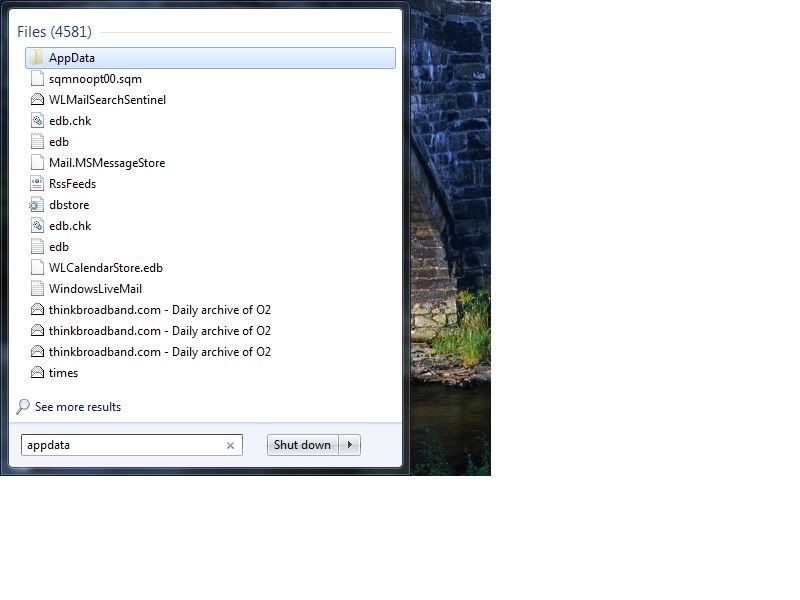
Simply entering 'appdata' in the search box that is immediately available from the 'Start' icon will take you to the required folder.
 0
0 -
could be a hidden folder in which case you need to turn on view hidden folders
http://www.sevenforums.com/tutorials/394-hidden-files-folders-show-hide.html
you could also create a desktop short cut to the folder to save hunting for it0 -
Thanks for the replies.
It was a hidden file which isn't anymore with your help!
The search box tip is also a very good option.0 -
Why do you need to access the AppData & Roaming folders in the first place? As their title says they are for use by the app itself. There is not normally anything of interest at the user level apart from backup purposes.
The fact that it is hidden is normally a good indication that you shouldn't be playing around in thereThis is a system account and does not represent a real person. To contact the Forum Team email forumteam@moneysavingexpert.com0 -
It is, but the usual thing that what ever is denied will interest you applies here. I think.
 0
0 -
Open my computer (or any explorer window), click the 'Organize' tab top left on the tool bar, then 'Folder and search options', then on the pop up box select the second tab 'View', then in the list against 'Hidden files and folders' select the radio button for 'Show hidden files, folders, and drives' then Apply if available and then Ok.
Just be very careful as it is now very easy to break things!!!4kWp, SSE, SolarEdge P300 optimisers & SE3500 Inverter, in occasionally sunny Corby, Northants.
Now with added Sunsynk 5kw hybrid ecco inverter & 15kWh Fogstar batteries. Oh Octopus Energy too.0 -
If you start poking about in hidden & system folders then what ever you do DO NOT delete anything from Windows\Winsxs folder to try to regain some hard drive space. If you do then you have a high probability of totally screwing your Windows.This is a system account and does not represent a real person. To contact the Forum Team email forumteam@moneysavingexpert.com0
-
like most things when switching to a new os theres allways little nuances that will throw you a little bit, like switching from windows 98 to 2000 (or in my case 98 to XP) it took me ages to get my head around where files were being stored.0
-
Why do you need to access the AppData & Roaming folders in the first place? As their title says they are for use by the app itself. There is not normally anything of interest at the user level apart from backup purposes.
The fact that it is hidden is normally a good indication that you shouldn't be playing around in there
I use Opera and am transferring all my settings....
Paths
Preferences
C:\Users\Tom\AppData\Roaming\Opera\Opera\operaprefs.ini
Saved session
C:\Users\Tom\AppData\Roaming\Opera\Opera\sessions\autopera.win
Bookmarks
C:\Users\Tom\AppData\Roaming\Opera\Opera\bookmarks.adr
Opera directory
C:\Users\Tom\AppData\Roaming\Opera\Opera
Cache
C:\Users\Tom\AppData\Local\Opera\Opera\cache
Help documents
C:\Users\Tom\AppData\Local\Opera\Opera\opcache
Mail directory
C:\Users\Tom\AppData\Local\Opera\Opera\mail0






This discussion has been closed.
Confirm your email address to Create Threads and Reply

Categories
- All Categories
- 354K Banking & Borrowing
- 254.3K Reduce Debt & Boost Income
- 455.3K Spending & Discounts
- 247.1K Work, Benefits & Business
- 603.7K Mortgages, Homes & Bills
- 178.3K Life & Family
- 261.2K Travel & Transport
- 1.5M Hobbies & Leisure
- 16.1K Discuss & Feedback
- 37.7K Read-Only Boards