We’d like to remind Forumites to please avoid political debate on the Forum.
This is to keep it a safe and useful space for MoneySaving discussions. Threads that are – or become – political in nature may be removed in line with the Forum’s rules. Thank you for your understanding.
📨 Have you signed up to the Forum's new Email Digest yet? Get a selection of trending threads sent straight to your inbox daily, weekly or monthly!
The Forum now has a brand new text editor, adding a bunch of handy features to use when creating posts. Read more in our how-to guide
We're aware that some users are currently experiencing slow loading times and errors on the Forum. Our tech team is working to resolve the issue. Thanks for your patience.
spyware scan and Internet Security 2010
Comments
-
I am going to assume that that file is still present;
Download ComboFix from one of these locations:
Link 1
Link 2
Link 3
* IMPORTANT !!! Save ComboFix.exe to your Desktop- Disable your AntiVirus and AntiSpyware applications, usually via a right click on the System Tray icon. They may otherwise interfere with our tools
- Double click on ComboFix.exe & follow the prompts.
- As part of it's process, ComboFix will check to see if the Microsoft Windows Recovery Console is installed. With malware infections being as they are today, it's strongly recommended to have this pre-installed on your machine before doing any malware removal. It will allow you to boot up into a special recovery/repair mode that will allow us to more easily help you should your computer have a problem after an attempted removal of malware.
- Follow the prompts to allow ComboFix to download and install the Microsoft Windows Recovery Console, and when prompted, agree to the End-User License Agreement to install the Microsoft Windows Recovery Console.
**Please note: If the Microsoft Windows Recovery Console is already installed, ComboFix will continue it's malware removal procedures.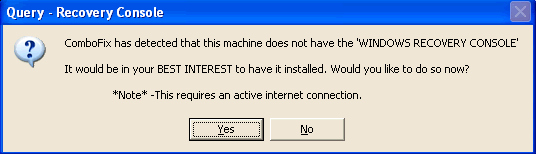
Once the Microsoft Windows Recovery Console is installed using ComboFix, you should see the following message: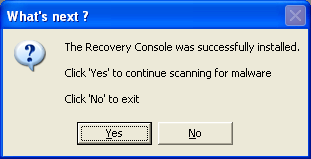
Click on Yes, to continue scanning for malware.
When finished, it shall produce a log for you. Please include the C:\ComboFix.txt in your next reply.0 - Disable your AntiVirus and AntiSpyware applications, usually via a right click on the System Tray icon. They may otherwise interfere with our tools
-
ComboFix 10-02-08.02 - Rich 08/02/2010 23:46:32.1.2 - x86
Microsoft Windows XP Home Edition 5.1.2600.3.1252.1.1033.18.1014.293 [GMT 0:00]
Running from: c:\documents and settings\Rich\Desktop\ComboFix.exe
.
((((((((((((((((((((((((((((((((((((((( Other Deletions )))))))))))))))))))))))))))))))))))))))))))))))))
.
c:\windows\COUPON~1.OCX
c:\windows\CouponPrinter.ocx
c:\windows\system32\11478.exe
c:\windows\system32\11942.exe
c:\windows\system32\15724.exe
c:\windows\system32\16827.exe
c:\windows\system32\18467.exe
c:\windows\system32\19169.exe
c:\windows\system32\23281.exe
c:\windows\system32\24464.exe
c:\windows\system32\26500.exe
c:\windows\system32\26962.exe
c:\windows\system32\28145.exe
c:\windows\system32\29358.exe
c:\windows\system32\2995.exe
c:\windows\system32\4827.exe
c:\windows\system32\491.exe
c:\windows\system32\5436.exe
c:\windows\system32\5705.exe
c:\windows\system32\6334.exe
c:\windows\system32\912b6b02-d418-561b-bbf5-82da1aedee28.exe
c:\windows\system32\9961.exe
.
((((((((((((((((((((((((( Files Created from 2010-01-08 to 2010-02-08 )))))))))))))))))))))))))))))))
.
2010-02-08 14:16 . 2010-02-08 14:16 388096 ----a-r- c:\documents and settings\Rich\Application Data\Microsoft\Installer\{0761C9A8-8F3A-4216-B4A7-B7AFBF24A24A}\HiJackThis.exe
2010-02-08 14:16 . 2010-02-08 14:16
d
w- c:\program files\TrendMicro
2010-02-08 13:28 . 2010-02-08 14:39 15944 ----a-w- c:\windows\system32\drivers\hitmanpro35.sys
2010-02-08 13:27 . 2010-02-08 14:36
d
w- c:\documents and settings\All Users\Application Data\Hitman Pro
2010-02-08 13:27 . 2010-02-08 13:27
d
w- c:\program files\Hitman Pro 3.5
2010-02-08 12:59 . 2010-02-08 12:59
dc----w- c:\documents and settings\All Users\Application Data\{BC9FCCF7-E686-494B-8C9B-55C9A39A7CA9}
2010-02-07 21:36 . 2010-02-08 10:40
d
w- c:\program files\Spyware Doctor
2010-01-22 18:08 . 2010-01-22 18:08
d
w- c:\program files\MasRizal
2010-01-22 18:07 . 2010-01-22 18:07
d
w- c:\windows\Downloaded Installations
2010-01-13 17:25 . 2010-01-13 17:28
d
w- c:\documents and settings\Rich\KironRaceViewer
2010-01-13 10:25 . 2009-11-21 15:51 471552
w- c:\windows\system32\dllcache\aclayers.dll
.
(((((((((((((((((((((((((((((((((((((((( Find3M Report ))))))))))))))))))))))))))))))))))))))))))))))))))))
.
2010-02-08 23:51 . 2008-09-30 21:39
d
w- c:\documents and settings\Rich\Application Data\Skype
2010-02-08 22:37 . 2008-09-30 21:44
d
w- c:\documents and settings\Rich\Application Data\skypePM
2010-02-08 22:37 . 2007-08-24 08:39
d---a-w- c:\documents and settings\All Users\Application Data\TEMP
2010-02-08 14:39 . 2006-11-21 20:37 246784 ----a-w- c:\windows\system32\drivers\iaStor.sys
2010-02-08 14:39 . 2009-01-24 15:12
d
w- c:\program files\Malwarebytes' Anti-Malware
2010-02-07 20:17 . 2008-09-04 12:41
d
w- c:\documents and settings\Rich\Application Data\FileZilla
2010-01-26 18:12 . 2007-12-06 09:35
d
w- c:\documents and settings\Rich\Application Data\LimeWire
2010-01-20 13:43 . 2009-09-15 20:24
d
w- c:\program files\Microsoft Silverlight
2010-01-07 16:07 . 2009-01-24 15:12 38224 ----a-w- c:\windows\system32\drivers\mbamswissarmy.sys
2010-01-07 16:07 . 2009-01-24 15:12 19160 ----a-w- c:\windows\system32\drivers\mbam.sys
2010-01-05 10:00 . 2004-08-10 12:51 832512 ----a-w- c:\windows\system32\wininet.dll
2010-01-05 10:00 . 2004-08-10 12:51 78336 ----a-w- c:\windows\system32\ieencode.dll
2010-01-05 10:00 . 2004-08-10 12:50 17408
w- c:\windows\system32\corpol.dll
2009-12-19 16:15 . 2007-09-15 13:24
d
w- c:\documents and settings\Rich\Application Data\NewsBin
2009-12-13 19:25 . 2009-08-21 11:44
d
w- c:\program files\Yahoo!
2009-11-29 10:29 . 2009-09-21 09:32 3695616 ----a-w- c:\documents and settings\All Users\Application Data\Lavasoft\Ad-Aware\Update\AutoLaunch.exe
2009-11-21 15:51 . 2004-08-10 12:50 471552 ----a-w- c:\windows\AppPatch\aclayers.dll
2007-09-14 14:51 . 2007-08-25 08:55 168 --sh--r- c:\windows\system32\4B3BD44527.sys
2007-09-14 14:52 . 2007-08-25 08:55 5018 --sha-w- c:\windows\system32\KGyGaAvL.sys
.
((((((((((((((((((((((((((((((((((((( Reg Loading Points ))))))))))))))))))))))))))))))))))))))))))))))))))
.
.
*Note* empty entries & legit default entries are not shown
REGEDIT4
[HKEY_CURRENT_USER\SOFTWARE\Microsoft\Windows\CurrentVersion\Run]
"MsnMsgr"="c:\program files\Windows Live\Messenger\msnmsgr.exe" [2009-07-26 3883856]
"Skype"="c:\program files\Skype\Phone\Skype.exe" [2008-08-12 21741864]
"filehippo.com"="c:\program files\filehippo.com\UpdateChecker.exe" [2008-12-31 146432]
[HKEY_LOCAL_MACHINE\SOFTWARE\Microsoft\Windows\CurrentVersion\Run]
"IgfxTray"="c:\windows\system32\igfxtray.exe" [2006-07-21 98304]
"HotKeysCmds"="c:\windows\system32\hkcmd.exe" [2006-07-21 86016]
"Persistence"="c:\windows\system32\igfxpers.exe" [2006-07-21 81920]
"SunJavaUpdateSched"="c:\program files\Java\jre6\bin\jusched.exe" [2009-10-18 149280]
"SigmatelSysTrayApp"="stsystra.exe" [2006-07-24 282624]
"IAAnotif"="c:\program files\Intel\Intel Matrix Storage Manager\Iaanotif.exe" [2006-07-06 151552]
"DMXLauncher"="c:\program files\Dell\Media Experience\DMXLauncher.exe" [2005-10-05 94208]
"QuickTime Task"="c:\program files\QuickTime\qttask.exe" [2006-11-21 98304]
"DLA"="c:\windows\System32\DLA\DLACTRLW.EXE" [2005-09-08 122940]
"ISUSPM Startup"="c:\progra~1\COMMON~1\INSTAL~1\UPDATE~1\ISUSPM.exe" [2004-07-27 221184]
"ISUSScheduler"="c:\program files\Common Files\InstallShield\UpdateService\issch.exe" [2004-07-27 81920]
"Samsung Common SM"="c:\windows\Samsung\ComSMMgr\ssmmgr.exe" [2005-07-03 372736]
"vptray"="c:\progra~1\SYMANT~1\SYMANT~1\vptray.exe" [2004-02-12 90224]
"NeroFilterCheck"="c:\windows\system32\NeroCheck.exe" [2001-07-09 155648]
"WinampAgent"="c:\program files\Winamp\winampa.exe" [2008-08-03 36352]
"Ad-Watch"="c:\program files\Lavasoft\Ad-Aware\AAWTray.exe" [2009-09-21 520024]
"HitmanPro35"="c:\program files\Hitman Pro 3.5\HitmanPro35.exe" [2010-02-08 5058880]
[HKEY_USERS\.DEFAULT\Software\Microsoft\Windows\CurrentVersion\Run]
"CTFMON.EXE"="c:\windows\system32\CTFMON.EXE" [2008-04-14 15360]
c:\documents and settings\All Users\Start Menu\Programs\Startup\
Dell Network Assistant.lnk - c:\windows\Installer\{0240BDFB-2995-4A3F-8C96-18D41282B716}\Icon0240BDFB3.exe [2006-11-21 7168]
Microsoft Office.lnk - c:\program files\Microsoft Office\Office\OSA9.EXE [1999-2-17 65588]
[HKEY_LOCAL_MACHINE\system\currentcontrolset\control\session manager]
BootExecute REG_MULTI_SZ autocheck autochk *\0lsdelete\0bootdelete
[HKEY_LOCAL_MACHINE\SYSTEM\CurrentControlSet\Control\SafeBoot\Minimal\Lavasoft Ad-Aware Service]
@="Service"
[HKLM\~\services\sharedaccess\parameters\firewallpolicy\standardprofile\AuthorizedApplications\List]
"%windir%\\system32\\sessmgr.exe"=
"c:\\Program Files\\LimeWire\\LimeWire.exe"=
"c:\\Program Files\\Dell Network Assistant\\ezi_hnm2.exe"=
"%windir%\\Network Diagnostic\\xpnetdiag.exe"=
"c:\\Program Files\\SmartFTP Client\\SmartFTP.exe"=
"c:\\Program Files\\Windows Live\\Messenger\\wlcsdk.exe"=
"c:\\Program Files\\Windows Live\\Messenger\\msnmsgr.exe"=
"c:\\Program Files\\Windows Live\\Sync\\WindowsLiveSync.exe"=
"c:\\Program Files\\Skype\\Phone\\Skype.exe"=
[HKLM\~\services\sharedaccess\parameters\firewallpolicy\standardprofile\GloballyOpenPorts\List]
"10421:UDP"= 10421:UDP:SingleClick Discovery Protocol
"10426:UDP"= 10426:UDP:SingleClick ICC
R0 Lbd;Lbd;c:\windows\system32\drivers\Lbd.sys [25/01/2009 10:29 64160]
R2 fssfltr;FssFltr;c:\windows\system32\drivers\fssfltr_tdi.sys [15/09/2009 20:23 54752]
S2 Lavasoft Ad-Aware Service;Lavasoft Ad-Aware Service;c:\program files\Lavasoft\Ad-Aware\AAWService.exe [18/01/2009 21:34 1028432]
S3 fsssvc;Windows Live Family Safety Service;c:\program files\Windows Live\Family Safety\fsssvc.exe [05/08/2009 21:48 704864]
S3 MXBULK;DualCam Still, MXBulk3.Sys;c:\windows\system32\drivers\MXBulk3.sys [16/10/2007 23:38 50688]
S3 MXCap;DSC-06 Video Camera;c:\windows\system32\drivers\MXCap3.sys [16/10/2007 23:38 63104]
.
Contents of the 'Scheduled Tasks' folder
2010-02-08 c:\windows\Tasks\Ad-Aware Update (Weekly).job
- c:\program files\Lavasoft\Ad-Aware\Ad-AwareAdmin.exe [2009-01-18 09:32]
.
.
Supplementary Scan
.
uStart Page = hxxp://www.google.com/
uSearchMigratedDefaultURL = hxxp://www.google.com/search?q={searchTerms}&sourceid=ie7&rls=com.microsoft:en-US&ie=utf8&oe=utf8
uDefault_Search_URL = hxxp://www.google.com/ie
uSearchAssistant = hxxp://www.google.com/ie
uSearchURL,(Default) = hxxp://www.google.com/search?q=%s
IE: &Compress Image Using Image Compressor 2008 - c:\program files\MasRizal\IMC2008\imcieex_compress.html
FF - ProfilePath - c:\documents and settings\Rich\Application Data\Mozilla\Firefox\Profiles\3scodjcr.default\
FF - prefs.js: browser.search.defaulturl - hxxp://www2.searchonthego.net/search.php?q=
FF - prefs.js: browser.search.selectedEngine - Yoog Search
FF - prefs.js: keyword.URL - hxxp://www2.searchonthego.net/search.php?q=
FF - component: c:\program files\Mozilla Firefox\extensions\{b5f59fa7-a1d4-09e1-9749-d1ef2029c248}\components\ec97b938-a49b-75eb-775c-e32bb7f4e481.dll
FF - plugin: c:\program files\K-Lite Codec Pack\Real\browser\plugins\nppl3260.dll
FF - plugin: c:\program files\K-Lite Codec Pack\Real\browser\plugins\nprpjplug.dll
FF - plugin: c:\program files\Mozilla Firefox\plugins\np-mswmp.dll
FF - plugin: c:\program files\Mozilla Firefox\plugins\npCouponPrinter.dll
FF - plugin: c:\program files\Viewpoint\Viewpoint Experience Technology\npViewpoint.dll
FF - plugin: c:\program files\Windows Live\Photo Gallery\NPWLPG.dll
FF - HiddenExtension: Microsoft .NET Framework Assistant: {20a82645-c095-46ed-80e3-08825760534b} - c:\windows\Microsoft.NET\Framework\v3.5\Windows Presentation Foundation\DotNetAssistantExtension\
---- FIREFOX POLICIES ----
true);
FF - user.js: browser.search.defaultenginename - Yoog Search
FF - user.js: browser.search.defaulturl - hxxp://www2.searchonthego.net/search.php?q=
FF - user.js: browser.search.selectedEngine - Yoog Search
FF - user.js: keyword.URL - hxxp://www2.searchonthego.net/search.php?q=
FF - user.js: keyword.enabled - true
.
- - - - ORPHANS REMOVED - - - -
HKCU-Run-A_M_P_NET - c:\program files\AntiMalwarePro\AntiMalwarePro.exe
SafeBoot-mmctl.sys
SafeBoot-wanatw4.sys
AddRemove-912b6b02-d418-561b-bbf5-82da1aedee28 - c:\windows\system32\912b6b02-d418-561b-bbf5-82da1aedee28.exe
AddRemove-{233cabe3-7257-4122-b48b-a5b1b16b26d4} - c:\windows\system32\rlvknlg.exe
**************************************************************************
scanning hidden processes ...
scanning hidden autostart entries ...
scanning hidden files ...
scan completed successfully
hidden files:
**************************************************************************
.
Completion time: 2010-02-08 23:52:25
ComboFix-quarantined-files.txt 2010-02-08 23:52
Pre-Run: 34,088,046,592 bytes free
Post-Run: 36,090,462,208 bytes free
WindowsXP-KB310994-SP2-Home-BootDisk-ENU.exe
[boot loader]
timeout=2
default=multi(0)disk(0)rdisk(0)partition(2)\WINDOWS
[operating systems]
c:\cmdcons\BOOTSECT.DAT="Microsoft Windows Recovery Console" /cmdcons
multi(0)disk(0)rdisk(0)partition(2)\WINDOWS="Microsoft Windows XP Home Edition" /noexecute=optin /fastdetect
- - End Of File - - D15948C9E8E301428782E19C9C244AA0"enough is a feast"...old Buddist proverb0 -
Reluctant spender...can I just thank you for your time. much appreciated."enough is a feast"...old Buddist proverb0
-
Is this your preferred search engine when using Firefox - searchonthego.net.
That run removed this file too - c:\program files\AntiMalwarePro\AntiMalwarePro.exe
I will look through the look properly when I return home this evening.
How's things running at the moment?0 -
Reluctant_spender wrote: »Is this your preferred search engine when using Firefox - searchonthego.net.
That run removed this file too - c:\program files\AntiMalwarePro\AntiMalwarePro.exe
I will look through the look properly when I return home this evening.
How's things running at the moment?
Honestly? My pc feels quite a bit faster and firefox is more stable; also those internet security pop ups have stopped. those are the most obvious changes.
Firefox would crash regularly, but hasnt crashed this morning (touch wood).
Firefox is my chosen browser and google my chosen search engine.
I am still getting a few pop ups regarding "yoog", but its a small pain for the improvement.
I have symantec anti virus running 2/8/2010 rev. 2. I notice an exclamation mark over the icon in the tray."enough is a feast"...old Buddist proverb0 -
0
-
Reluctant_spender wrote: »How's things running at the moment?
Hello,
I have been told this morning from several contacts on my msn messenger a link was sent to them with the virus link.
Any suggestions please?"enough is a feast"...old Buddist proverb0 -
As suggested above run malwarebytes - update it first and then run;
Please download GooredFix and save it to your Desktop.- Double-click GooredFix.exe on your Desktop to run it.
- Select "2. Fix Goored" by typing 2 and pressing Enter.
- Make sure all instances of Firefox are closed at this point.
- Type y at the prompt and press Enter again.
- A log will open, please post the contents of that log in your next reply (it can also be found on your desktop, called GooredLog.txt).
0





This discussion has been closed.
Confirm your email address to Create Threads and Reply

Categories
- All Categories
- 354.4K Banking & Borrowing
- 254.4K Reduce Debt & Boost Income
- 455.4K Spending & Discounts
- 247.3K Work, Benefits & Business
- 604.1K Mortgages, Homes & Bills
- 178.5K Life & Family
- 261.6K Travel & Transport
- 1.5M Hobbies & Leisure
- 16K Discuss & Feedback
- 37.7K Read-Only Boards