We’d like to remind Forumites to please avoid political debate on the Forum.
This is to keep it a safe and useful space for MoneySaving discussions. Threads that are – or become – political in nature may be removed in line with the Forum’s rules. Thank you for your understanding.
📨 Have you signed up to the Forum's new Email Digest yet? Get a selection of trending threads sent straight to your inbox daily, weekly or monthly!
The Forum now has a brand new text editor, adding a bunch of handy features to use when creating posts. Read more in our how-to guide
domain name server

chelleybelley
Posts: 580 Forumite
in Techie Stuff
hi im having problems with the loading the internet and messages saying that the domain name server is down can anyone help to correct this problem before i launch the computer ahhhh!!! ive googled it and ended up more confused than before, so can i have the easy version if anyone knows.
kind regards
chelley
kind regards
chelley
always send a smile as it costs nothing..
:beer:
:beer:
0
Comments
-
what website are you trying to reach ?? DNS translates the address that you type into the address bar, into numbers(ip addresses) that computers use to connectto the correct server0
-
its not one selected website its a lot of themalways send a smile as it costs nothing..
:beer:0 -
an example of one ?0
-
one of them is this site and satio worldalways send a smile as it costs nothing..
:beer:0 -
You need to change your DNS settings then. See here for details on doing it on XP: http://www.mediacollege.com/computer/network/dns.html, which I've quoted below:(1) Specify the DNS to be Used
This method tells your computer which DNS to use for all your internet browsing. Most home users have this set to "automatic" and the DNS is provided by the user's ISP, but you can use any DNS you like (you can even make your own DNS if you're keen).
To set your DNS, you need to find the Internet Protocol window.
For Users on a Dial-up Connection:Go to My Computer>Dialup Networking.Right-click your internet connection and select Properties. A window will open - click the Server Types tab. Click TCP/IP Settings.
For All Other Users:Go to Control Panel>Network Connections and select your local network.Click Properties, then select Internet Protocol (TCP/IP).Click Properties.
You will see a window like the one below - this is the Internet Protocol window. Select "Use the following DNS server addresses" and enter the desired DNS server(s) in the space(s) provided.Note: To add more DNS servers, click Advanced then the DNS tab.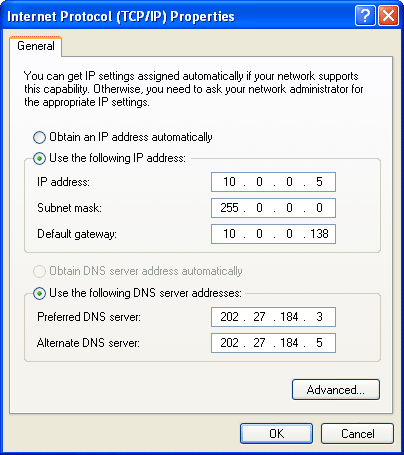
Insert the DNS addresses 8.8.8.8 or 8.8.4.4 or maybe 208.67.222.222
If you're using Vista,- Click the Start Orb, then select Control Panel.
- Click on View network status and tasks.
- Click on View status.
- Click the Properties button.
- Vista may ask for your permission to make changes. If so, click the Continue button.
- Select Internet Protocol Version 4 (TCP/IPv4), then click the Properties button.
- Click the radio button Use the following DNS server addresses: and type in OpenDNS addresses in the Preferred DNS server and Alternate DNS server fields.
- Click the OK button, then the Close button, and the Close button again. Close the Network and Sharing Center window.
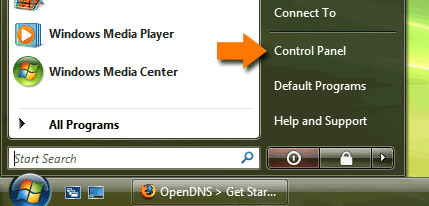
2. Click on View network status and tasks.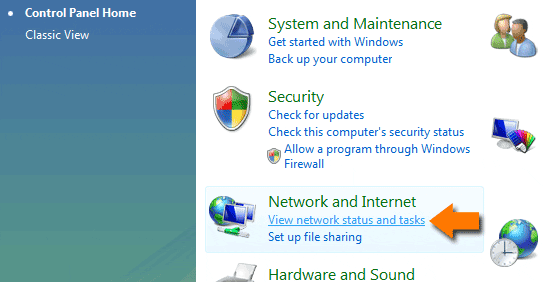
3. Click on View status.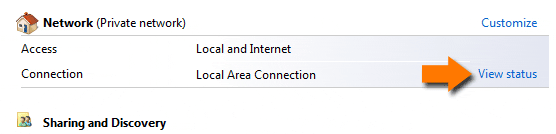
4. Click the Properties button.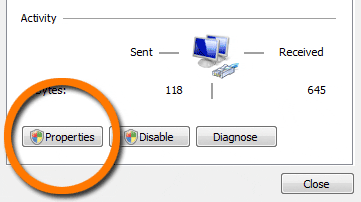
5. Vista may ask for your permission to make changes. If so, click the Continue button.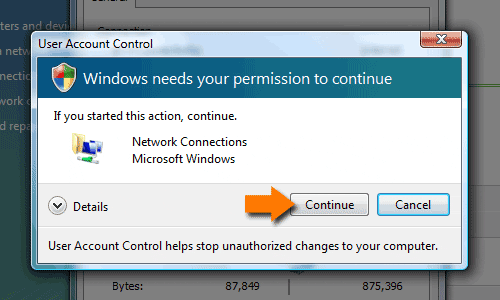
6. Select Internet Protocol Version 4 (TCP/IPv4), then click the Properties button.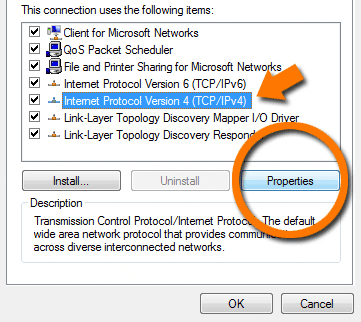
7. Click the radio button Use the following DNS server addresses: and type in OpenDNS addresses in the Preferred DNS server and Alternate DNS server fields.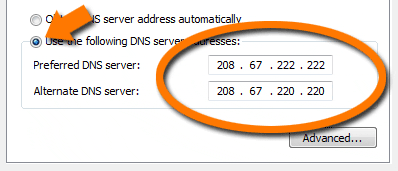
8. Click the OK button, then the Close button, and the Close button again. Close the Network and Sharing Center window.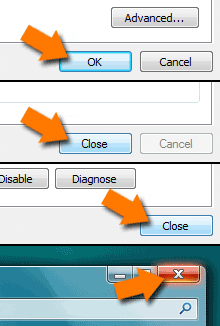 0
0 -
i am using vista do i use the numbers in the pic??always send a smile as it costs nothing..
:beer:0 -
right ive managed to sort out the numbers but the IP address is empty and its saying the adaptor needs at least one valid IP address??always send a smile as it costs nothing..
:beer:0 -
You'll need to enter 2 server IPs
8.8.8.8 and 8.8.4.4 are the 2 Google public DNS IPs
208.67.222.222 is an OpenDNS server IP
I'd suggest you use the Google ones. I've been using these for quite a while now and they work well.
The operating system is pretty much irrelevant other than the details of how to enter the IPs as opposed o which to use.
=====
You can leave the actual machine IP address to "obtain automatically" and the router should issue it0 -
what about the ip address as it wont let me continue without italways send a smile as it costs nothing..
:beer:0 -
I updated my post while you were reading it after seeing your question - leave it as obtain automatically.
The chances are that your ISP will have sorted their DNS by now anyway.0
This discussion has been closed.
Confirm your email address to Create Threads and Reply

Categories
- All Categories
- 353.5K Banking & Borrowing
- 254.1K Reduce Debt & Boost Income
- 455K Spending & Discounts
- 246.6K Work, Benefits & Business
- 602.9K Mortgages, Homes & Bills
- 178.1K Life & Family
- 260.6K Travel & Transport
- 1.5M Hobbies & Leisure
- 16K Discuss & Feedback
- 37.7K Read-Only Boards