We’d like to remind Forumites to please avoid political debate on the Forum.
This is to keep it a safe and useful space for MoneySaving discussions. Threads that are – or become – political in nature may be removed in line with the Forum’s rules. Thank you for your understanding.
📨 Have you signed up to the Forum's new Email Digest yet? Get a selection of trending threads sent straight to your inbox daily, weekly or monthly!
The Forum now has a brand new text editor, adding a bunch of handy features to use when creating posts. Read more in our how-to guide
Wireless Network problem

Jomo
Posts: 8,253 Forumite
in Techie Stuff
I'm with VirginMedia and have recently reinstalled all Windows XP software on my laptop and in the process of resetting up my wireless network.
The router and modem are both working, I can see the SSID is working but when I go to 'view wireless networks' all it says is 'Windows cannot configure this wireless connection etc.' VirginMedia cannot assist me with this and I have downloaded all the available files from Dell. I'm at a loss!
Any suggestions?

The router and modem are both working, I can see the SSID is working but when I go to 'view wireless networks' all it says is 'Windows cannot configure this wireless connection etc.' VirginMedia cannot assist me with this and I have downloaded all the available files from Dell. I'm at a loss!
Any suggestions?
0
Comments
-
I know what the problem is - but don't have the solution to hand at the moment - give me a couple of minutes and I'll get back to you (or you can google for the fix yourself !)
The problem is that Virgin uses it's own software for managing the wireless connection, and this switches off the Windows wireless connection manager.
You can either use Virgin's software, or disable it and re-enable Windows version.
I find the Windows version better.Gus.0 -
what network card are you running?Don't try to teach a pig to sing - it wastes your time and annoys the pig0
-
Ah thanks for that! Just to let you know that on VirginMedia's instructions I took off their software.0
-
Got it !
I think you'll find that the Virgin software has turned off a little program called Windows Zero Configuration (WZC).
1. Click Start and Run
2. Type into the Run box "services.msc" (without the quotation).
3. Scroll down and look for the service Wireless Zero Configuration
4. Double Click on the Service
5.Make sure that it is Started and that the startup type is set to automatic.
Screenshot :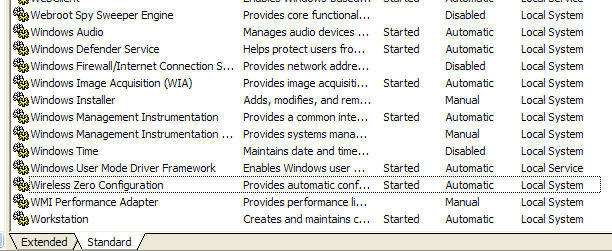
You'll probably get a message asking if you want Windows to be the default program - if you select yes it'll disable the Virgin program.Gus.0 -
Ignore the advice about disabling the Virgin software - I see you've uninstalled it.
Doing that won't have switched WZC back on though.Gus.0 -
If it is a potential (missing) WZC problem then have a look also at this thread (with screen-shots) .
HTH.0 -
The_Mighty_Gusset wrote: »Ignore the advice about disabling the Virgin software - I see you've uninstalled it.
Doing that won't have switched WZC back on though.
No worries, it was already uninstalled but no matter because I've just managed to get it set up so thanks for your help.
I did as you told me and from there I managed to get it sorted!! So thanks again, I can now get all my furniture set back up where they should be!! lol0 -
This discussion has been closed.
Confirm your email address to Create Threads and Reply

Categories
- All Categories
- 353.5K Banking & Borrowing
- 254.2K Reduce Debt & Boost Income
- 455.1K Spending & Discounts
- 246.6K Work, Benefits & Business
- 603K Mortgages, Homes & Bills
- 178.1K Life & Family
- 260.6K Travel & Transport
- 1.5M Hobbies & Leisure
- 16K Discuss & Feedback
- 37.7K Read-Only Boards