We’d like to remind Forumites to please avoid political debate on the Forum.
This is to keep it a safe and useful space for MoneySaving discussions. Threads that are – or become – political in nature may be removed in line with the Forum’s rules. Thank you for your understanding.
📨 Have you signed up to the Forum's new Email Digest yet? Get a selection of trending threads sent straight to your inbox daily, weekly or monthly!
The Forum now has a brand new text editor, adding a bunch of handy features to use when creating posts. Read more in our how-to guide
Graphics Adaptor

Always_Harassed
Posts: 1,087 Forumite
in Techie Stuff
I have a 2" plug that goes between my monitor cable and my pc. I think it is some sort of graphincs adaptor and it doesn't seem to be working. Can anyone tell me what it is called so I can buy a new one or better than that is there any software that will do the same job. I think it has been damaged when the monitor has been moved. Several of the pins are not there, don't know if this is design or damage. One last question will I be able to use my pc for a prolonged time without this. It happened once before and then starting working again on its own, but I only got a short time on my pc before I got an error message telling me to connect it again. Thanks for all your help, am reasonable with software but not hardware.
0
Comments
-
Several pins missing is normal, not all adaptors are the same.
>will I be able to use my pc for a prolonged time without this
If it works without then fine, why is it there then??
Adaptors available are : DVI (versions ) to VGA - DVI to HDMI - Whats yours
Have you dislodged the graphics card ??0 -
totalsolutions wrote: »Several pins missing is normal, not all adaptors are the same.
>will I be able to use my pc for a prolonged time without this
If it works without then fine, why is it there then??
Adaptors available are : DVI (versions ) to VGA - DVI to HDMI - Whats yours
Have you dislodged the graphics card ??
There is nothing on the adaptor to let you know what it is. The PC display is not working properly but usable. Need to use pc for a lot tody most notably ebay posting.0 -
Probably one of these (£0.99p)
http://cgi.ebay.co.uk/DVI-I-M-to-VGA-Monitor-F-Converter-Adaptor-15pin-SVGA_W0QQitemZ290376962435QQcmdZViewItemQQptZUK_Computing_CablesConnectors_RL?hash=item439bd0d183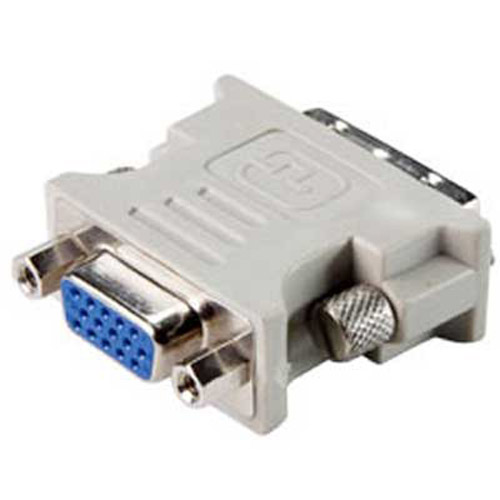
I doubt this is your problem though. A PC isn't going to display a message telling you to connect a monitor (how would it unless it was a monitor message (no input)??)
More info required......0 -
The Warning message I am getting is
The Catalyst Control Center is not supported by the driver version of your enabled graphics adapter. Please update your ATI graphics driver or enable your ATI adapter using the Displays Manager.
The PC will work without the adapter but the font size is distorted and can be blurry.0 -
Thanks CHR15 that looks exactly what I need. Will order one just now. Cheers0
-
Do you know the model of your graphics card (and your OS)?0
-
It is a Dell computer operating with Vista without modifications. It is a basic PC think it was an Inspron and is just under 2 yrs old. Do get regular updates via Windows downloads but to be honest I don't check what is being updated.0
-
Having similar problems with my ATI card on and off. Think it's to do with the adapter for my 2nd monitor being too heavy or something. All of a sudden, the catalyst will lose the ati drivers. Reinstalling them and replugging in of the monitors usually fixes it for a few months. Must get round to replacing my pc one day
 4 Stones and 0 pounds or 25.4kg lighter :j0



This discussion has been closed.
Confirm your email address to Create Threads and Reply

Categories
- All Categories
- 353.5K Banking & Borrowing
- 254.1K Reduce Debt & Boost Income
- 455K Spending & Discounts
- 246.6K Work, Benefits & Business
- 602.9K Mortgages, Homes & Bills
- 178.1K Life & Family
- 260.6K Travel & Transport
- 1.5M Hobbies & Leisure
- 16K Discuss & Feedback
- 37.7K Read-Only Boards