We’d like to remind Forumites to please avoid political debate on the Forum.
This is to keep it a safe and useful space for MoneySaving discussions. Threads that are – or become – political in nature may be removed in line with the Forum’s rules. Thank you for your understanding.
📨 Have you signed up to the Forum's new Email Digest yet? Get a selection of trending threads sent straight to your inbox daily, weekly or monthly!
The Forum now has a brand new text editor, adding a bunch of handy features to use when creating posts. Read more in our how-to guide
New laptop problem

biggar_2
Posts: 96 Forumite
in Techie Stuff
I have a new laptop but when I try to send an email everything jumps about. What I mean is when I'm typing and perhaps I'm on the 3rd line, suddenly it jumps up to the top line and even into the middle of a word.
I'm utterly confused. Could someone help please?
Also, must I always put in my password when I'm logging on. Is there a way past this?
Thanks
I'm utterly confused. Could someone help please?
Also, must I always put in my password when I'm logging on. Is there a way past this?
Thanks
0
Comments
-
I guess the first thing to eliminate is your tracking device - are your hands accidentally brushing against the trackpad or something?
If you have an external mouse plugged in, unplug it and use the onboard one to eliminate that.
Let us know what operating system you have etc and someone can probably help out with the password stuff.0 -
If you use an online email service make sure the page has fully loaded before you start, it can be due to pics etc not having loaded fully first.Weight loss since 01/08/07 - 72 lbs:j0
-
I don't use an online email service. I don't have an external mouse. What is a trackpad?
I am on XP windows.
That is all I know! :eek:
Thank you both for answering me.0 -
Like the previous poster, I reckon it is your PC trackpad/touchpad. It looks something like this:
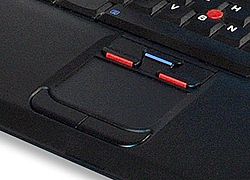

If the sensitivity setting is too fine then you will get exactly the symptoms that you describe. Try adjusting the device in control panel. Or look in the system tray at the bottom right of the screen a little icon that looks something like the trackpad. Most laptops have some kind of resident utility to allow you to make adjustments.
Mike0 -
Thank you Mike
I'm off to work now but I'll have a look at this when I return.0 -
biggar wrote:Also, must I always put in my password when I'm logging on. Is there a way past this?
Try...
Click Start & select "Run..."
Type "control userpasswords2" in the box and click Ok
With any luck a window will appear. In the window there will be a check box saying something like "users must enter a username and password to use this computer".
Uncheck the box and click ok.0 -
Had the same problem with the cursor jumping. It was the "touchpad". Too close to the spacebar for my big clumsy fingers.0
-
joshm wrote:Try...
Click Start & select "Run..."
Type "control userpasswords2" in the box and click Ok
With any luck a window will appear. In the window there will be a check box saying something like "users must enter a username and password to use this computer".
Uncheck the box and click ok.
O heck! I did this and I can't log on at all.
Help!0 -
It shouldn't need you to logon because it should do it automatically. What happens when you can't logon? Do you get any error messages? Can you describe what happens to us please.
 0
0 -
tigermatt wrote:It shouldn't need you to logon because it should do it automatically. What happens when you can't logon? Do you get any error messages? Can you describe what happens to us please.
The latest message is
there is an ip address conflict with another system on the network.0


This discussion has been closed.
Confirm your email address to Create Threads and Reply

Categories
- All Categories
- 353.5K Banking & Borrowing
- 254.1K Reduce Debt & Boost Income
- 455K Spending & Discounts
- 246.6K Work, Benefits & Business
- 602.9K Mortgages, Homes & Bills
- 178K Life & Family
- 260.6K Travel & Transport
- 1.5M Hobbies & Leisure
- 16K Discuss & Feedback
- 37.7K Read-Only Boards