Ready, steady… save!
You don’t need a chart to join in. Here are 2 ways to record your savings:
1. Cross it off
Pop a chart into your first post. Saved an amount? Cross it out! Read more »
£0.01 £0.02 £0.03
2. Write it down
Skip the chart and add updates to your first post. Read more »
“Another +£3 saved today. Go me!”
Use +£ before each new saving so it counts towards your total.
📨 Have you signed up to the Forum's new Email Digest yet? Get a selection of trending threads sent straight to your inbox daily, weekly or monthly!
VHS to DVD via PC

msaquib
Posts: 717 Forumite
in Techie Stuff
Hi,
I have seen this on ebay:-
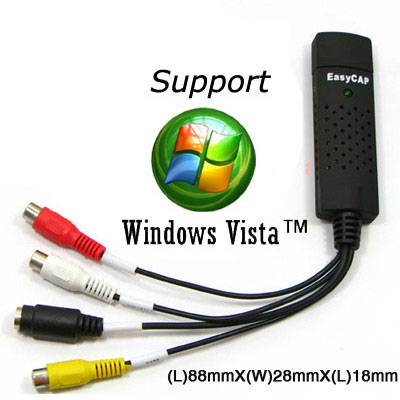
more details here http://cgi.ebay.co.uk/USB-Video-TV-VHS-DV-Capture-Device-DVD-Maker-Ulead_W0QQitemZ270366634016QQcmdZViewItemQQptZUK_CCTV?hash=item270366634016&_trksid=p3286.c0.m14&_trkparms=72%3A1690%7C66%3A2%7C65%3A12%7C39%3A1%7C240%3A1318
Has anyone actualy used this to transfer VHS to DVD? anywhere to by in the UK?
Thanks
MS
I have seen this on ebay:-
more details here http://cgi.ebay.co.uk/USB-Video-TV-VHS-DV-Capture-Device-DVD-Maker-Ulead_W0QQitemZ270366634016QQcmdZViewItemQQptZUK_CCTV?hash=item270366634016&_trksid=p3286.c0.m14&_trkparms=72%3A1690%7C66%3A2%7C65%3A12%7C39%3A1%7C240%3A1318
Has anyone actualy used this to transfer VHS to DVD? anywhere to by in the UK?
Thanks
MS
0
Comments
-
I have something similar. What they don't tell you is that it just captures raw video and stuffs it down the USB. Its a continual stream of a lot of data, so the processor has to try and stuff it on the hard drive as fast as possible. Uncompressed this is a really heavy workload and will quickly fill up your hard drive. Also it may take hours of computer time later to encode it to DVD format. Alternatively you can usually set the software to compress (encode) the video as it comes in but that requires tremendous processing power otherwise it will miss some bits and you get 'dropped frames' and jumpy video. If your computer isn't powerful enough it simply wont capture at DVD standard of video size at enough frame rate.
Moral of the story, unless you have a pokey computer, running nothing else at the time, and you keep your hard drive defragmented - forget it!
I have all that and was still disappointed with the results.
Your much better off with something that does it with hardware like a cheap DVD recorder or AV Recording hard drive.0 -
Or you could get a cheap TV card with an aerial input. Most come with software for recording to file. Once you've done that, then all you'd need to do is burn the file to DVD with Nero or whatever DVD burning software you have (InfraRecorder will do the job and is free).SIMPLE SIMON - Met a pie man going to the fair. Said Simple Simon to the pie man, "What have you got there?" Said the pie man unto Simon, "Pies, you simpleton!"0
-
A few people seem to be using this too. Cant vouch for it though:
http://www.amazon.co.uk/Pinnacle-Systems-8230-10063-01-Dazzle-Recorder/dp/B001918NLCSIMPLE SIMON - Met a pie man going to the fair. Said Simple Simon to the pie man, "What have you got there?" Said the pie man unto Simon, "Pies, you simpleton!"0 -
Any computer made in the last 2 or 3 years will be able to compress this video to mpeg2 in real time to be burned to DVD. You really don't want to do that though, you want to capture to huffyuv or another lossless compression codec, so you can edit the video before burning. Cropping out the black borders and adverts or whatever.
Again, any modern pc will have no trouble with this.They say it's genetic, they say he can't help it, they say you can catch it - but sometimes you're born with it0

This discussion has been closed.
Confirm your email address to Create Threads and Reply

Categories
- All Categories
- 355.9K Banking & Borrowing
- 255K Reduce Debt & Boost Income
- 456.2K Spending & Discounts
- 248.4K Work, Benefits & Business
- 606.1K Mortgages, Homes & Bills
- 179.1K Life & Family
- 264K Travel & Transport
- 1.5M Hobbies & Leisure
- 16.2K Discuss & Feedback
- 37.7K Read-Only Boards