We’d like to remind Forumites to please avoid political debate on the Forum.
This is to keep it a safe and useful space for MoneySaving discussions. Threads that are – or become – political in nature may be removed in line with the Forum’s rules. Thank you for your understanding.
📨 Have you signed up to the Forum's new Email Digest yet? Get a selection of trending threads sent straight to your inbox daily, weekly or monthly!
The Forum now has a brand new text editor, adding a bunch of handy features to use when creating posts. Read more in our how-to guide
New Keyboard

maryfrench
Posts: 154 Forumite
in Techie Stuff
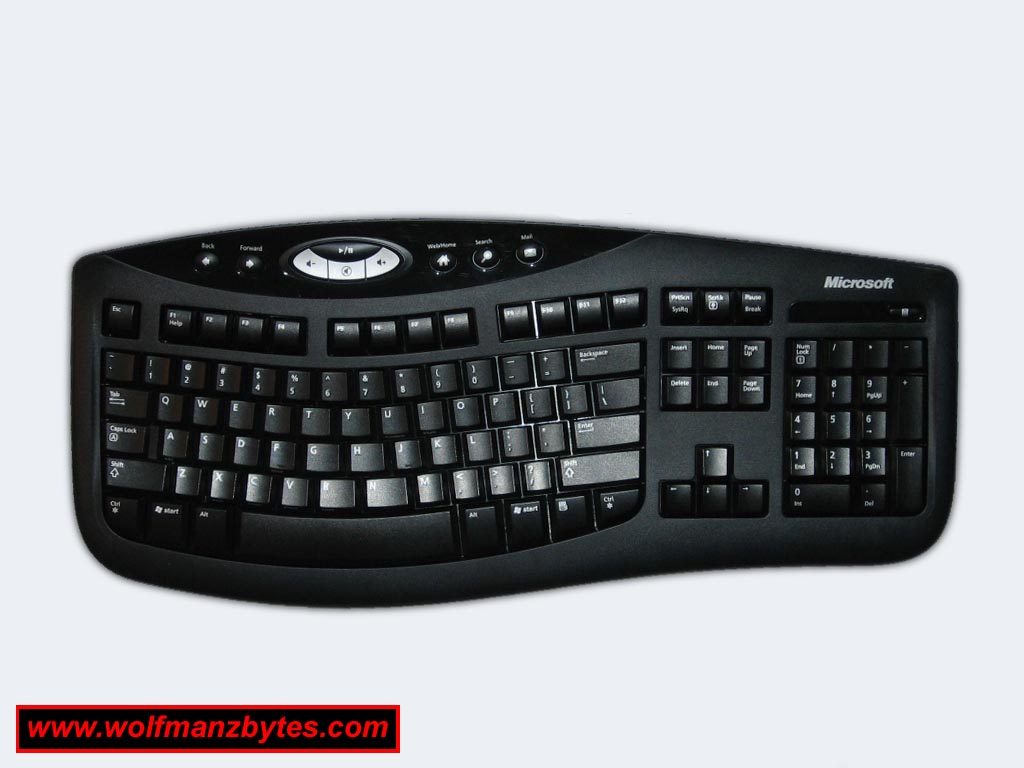
Can anyone help me with finding the key to open Internet exlorer using my keyboard. Its Microsoft comfort curved 2000 keyboard. It doesn't come with a manual as I expect most people don't need one. I do I'm afraid to say.
Thanks .
Thanks .
0
Comments
-
From this picture I'd say the Web/Home button.
Although you might need to install the software to set that function up, just fill the details in here and follow the instructions..0 -
The web/home button only works when I'm on explorer and it goes to my home page. there isn't anything in the install instructions that tells me anything, only installs. But thanks for answering.0
-
The software should install into your Start Menu, under Programs something like Microsoft Keyboard or Intellitype which you configure your keyboard through.0
-
I've made a mistake. The keyboard never came with an install disc it was the mouse I installed also today that had a disc. So I just plugged the new keyboard into a port and it worked. Any ideas.0
-
I've made a mistake. The keyboard never came with an install disc it was the mouse I installed also today that had a disc. So I just plugged the new keyboard into a port and it worked. Any ideas.Although you might need to install the software to set that function up, just fill the details in here and follow the instructions..
Just follow that link, select the appropriate options and download the software.0 -
Hi anewhope. Thanks for your reply. Is it ok to install the software after I have plugged in the keyboard as I have read somewhere that it messes up the item if you install it first. I am a 70 year old lady so forgive me for not being really computer literate. But I have installed both things today by myself so I'm not doing too badly I think.0
-
Hi anewhope. Thanks for your reply. Is it ok to install the software after I have plugged in the keyboard as I have read somewhere that it messes up the item if you install it first. I am a 70 year old lady so forgive me for not being really computer literate. But I have installed both things today by myself so I'm not doing too badly I think.
Yes it's fine to do it as this is just the program that allows you to customise what buttons do, set the curser speed etc rather than the software driver to make it work with your computer.0 -
Thanks I did it and it works fine. I press the web/home key and it opens up explorer to the home page. Thanks again for your help.0



This discussion has been closed.
Confirm your email address to Create Threads and Reply

Categories
- All Categories
- 353.5K Banking & Borrowing
- 254.2K Reduce Debt & Boost Income
- 455.1K Spending & Discounts
- 246.6K Work, Benefits & Business
- 603K Mortgages, Homes & Bills
- 178.1K Life & Family
- 260.6K Travel & Transport
- 1.5M Hobbies & Leisure
- 16K Discuss & Feedback
- 37.7K Read-Only Boards