We’d like to remind Forumites to please avoid political debate on the Forum.
This is to keep it a safe and useful space for MoneySaving discussions. Threads that are – or become – political in nature may be removed in line with the Forum’s rules. Thank you for your understanding.
📨 Have you signed up to the Forum's new Email Digest yet? Get a selection of trending threads sent straight to your inbox daily, weekly or monthly!
The Forum now has a brand new text editor, adding a bunch of handy features to use when creating posts. Read more in our how-to guide
Unsecuered broadband
Comments
-
OK! Instructions for finding out what an RJ45 network cable is.I don't even know what one is or where i'd look :embarasse
1. Launch browser, i.e. IE or Firefox.
2. Go to www.google.couk using browser
3. Type RJ45 network cable into google search box
4. Press the <Enter> key on keyboard, (it's the one with the word 'Enter' written on it).
5. Use eyeballs
to look at screen
The first link, (other than shopping ones), on the first page shows.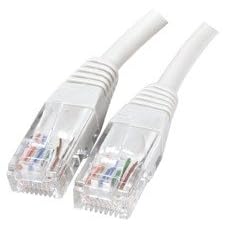
Unless you're going to make some effort to help yourself this is going to be a very long and tedious experience for all concerned.0 -
Try reading the D-Linl DI-524 manual.Help Keep me off Facebook!!!! I need a break !!!
:rolleyes:
That really is up to you! begining to think it will never be secure:doh: Blue text on this forum usually signifies hyperlinks, so click on them!..:wall:0
 -
Thanks for the quick replys, this is all way above my head i think the router is a dlink model no d1-524 and the modem says property of ntl and has no other numbers on ... we use them to connect to a pc in the loft and also my lap top by it's own wireless router but we've never been able to use both o connect to the internet at the same time. I only found out our connection wasn't secure when i was having trouble connecting and clicked to see connections and found all our nieghbours were secured and ours wasn't!!!!
just trying to confirm that you have 2 routers? it would simplify if you only use 1. if you use one wireless router to connect to the modem, both the PC and laptop should be able to connect to it, and then to the internetDon't try to teach a pig to sing - it wastes your time and annoys the pig0 -
Hi - scuze me for butting in ,but I have the same problem and think that the Polish lodgers next door are using our connection !
- i have typed 192.168.0.1 into the google chrome browser and it has come back with the netgear password box to login ,but I think its allready been secured ( by them ?! ) and I cant login0 -
Hi - scuze me for butting in ,but I have the same problem and think that the Polish lodgers next door are using our connection !
- i have typed 192.168.0.1 into the google chrome browser and it has come back with the netgear password box to login ,but I think its allready been secured ( by them ?! ) and I cant login
When prompted, enter admin for the user name and password for the password, both in lower case letters, those are the default. If that does not work, reset the router as per the user manual and set it up yourself to make it secure. Note you will need to set up wireless encryption - WPA not just the router login password.:doh: Blue text on this forum usually signifies hyperlinks, so click on them!..:wall:0 -
Hi - scuze me for butting in ,but I have the same problem and think that the Polish lodgers next door are using our connection !
- i have typed 192.168.0.1 into the google chrome browser and it has come back with the netgear password box to login ,but I think its allready been secured ( by them ?! ) and I cant login
Are you sure it wasn't set up with a different password?-the norm is to change the default when setting up.
If you can't get in, then do a factory reset on the router and it will default back to the standard username and p/word, however you will then have to re-enter your ISP settings to reconnect again.
What router are you using?No free lunch, and no free laptop 0
0 -
thanks both of you - its a netgear 8340
-
wireless encryption - WPA ?? is that in the netgear menu ?0
-
No such model-do you mean the Netgear DG834G? And which version number?-it's on the label on the base, i.e v1, v2 etc.No free lunch, and no free laptop0
-
wireless encryption - WPA ?? is that in the netgear menu ?
Yes WPA-PSK on the Wireless Settings page. There are several versions of the DG 834 so get the manual for your version from their website.:doh: Blue text on this forum usually signifies hyperlinks, so click on them!..:wall:0





This discussion has been closed.
Confirm your email address to Create Threads and Reply

Categories
- All Categories
- 353.6K Banking & Borrowing
- 254.2K Reduce Debt & Boost Income
- 455.1K Spending & Discounts
- 246.7K Work, Benefits & Business
- 603K Mortgages, Homes & Bills
- 178.1K Life & Family
- 260.7K Travel & Transport
- 1.5M Hobbies & Leisure
- 16K Discuss & Feedback
- 37.7K Read-Only Boards