We’d like to remind Forumites to please avoid political debate on the Forum.
This is to keep it a safe and useful space for MoneySaving discussions. Threads that are – or become – political in nature may be removed in line with the Forum’s rules. Thank you for your understanding.
📨 Have you signed up to the Forum's new Email Digest yet? Get a selection of trending threads sent straight to your inbox daily, weekly or monthly!
The Forum now has a brand new text editor, adding a bunch of handy features to use when creating posts. Read more in our how-to guide
Adding RAM

windym_2
Posts: 5,261 Forumite



in Techie Stuff
Can anyone explain how easy it is to add RAM. My parents are running VISTA on 1gb and it is SOOOOOoooo slow.
I think I've seen a website link on here which you can use to scan your PC and it will advise which to buy? I can manage that (anyone got the linky). But what do I do when the package arrives?:o
They also have a lappy, could the same be done with that?
TIA.
I think I've seen a website link on here which you can use to scan your PC and it will advise which to buy? I can manage that
(anyone got the linky). But what do I do when the package arrives?:oThey also have a lappy, could the same be done with that?
TIA.
0
Comments
-
this is the scanner
http://www.crucial.com/uk/
it will tell you what is already in the PC and laptop and what the maximum is you can put in it
To fit
1) PC open the side and locate the existing Ram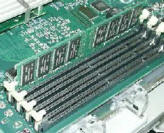
http://helpdesk.its.uiowa.edu/demo/buyingguide/ram.htm
and click it in , then just reboot and it detects
2) Laptop , normally just turn it over and iopen a small cover and insert
replace cover and reboot and it will detect
3 )if ALL the existing slots are full then you may need to remove the existing ram and swap ...ie 2 X 512 = 1Gb , to upgrade to 2Gb you will remove and replace with 2 X 1GbEx forum ambassador
Long term forum member0 -
STAR! Thanks.0
-
Whilst 1 gig is really a minimum for running Vista, it shouldnt run THAT slow.
Id be looking at a possible nasty on your computer first ~
Download MALWAREBYTES
http://www.download.com/Malwarebytes-Anti-Malware/3000-8022_4-10804572.html
UPDATE and FULL SCAN
If it finds anything then post the log here (In sections if need be)
The other thing to do is look at all 'start up' processes. Maybe the virus scanner runs on start up? Has anything been installed recently tha could be causing the problem?
Open up the TASK MANAGER (Right click on the bottom bar) and find all running processes once its booted up. Find if anything in particular is using a lot of CPU power:idea:0 -
When installing on a laptop always remove Power from laptop and also remove the battery.
Turn on laptop without any power or battery attached to check no residual power is left in the unit0 -
Vista runs OK on 1GB. I think I'd be uninstalling the pre-installed junk on them. Typically they come with Norton and also have Norton Ghost running as well - both of which eat resources and impact on file reading speed.
Use Decrapifier to remove it all.0 -
Thanks.
Ive done all the malware stuff. Reduced the startup progs to those that are relevant. They run AVGfree so no resource hungry antivirus. Everything that is not required has been uninstalled and a good Ccleaner and defrag has tidied most up.
I think the RAM will do the job. Thanks for the step-by guide Browntoa!0 -
If its a slowish processor, id recommend using AVIRA or AVAST anti virus over AVG:idea:0
-
Thanks.
Ive done all the malware stuff. Reduced the startup progs to those that are relevant. They run AVGfree so no resource hungry antivirus. Everything that is not required has been uninstalled and a good Ccleaner and defrag has tidied most up.
I think the RAM will do the job. Thanks for the step-by guide Browntoa!
Decrapifier isn't malware related. It removes all the preinstalled junk.
AVG is horrendous. It's a very slow scanner. I've just come back from doing a mates computer. It was so slow he actually threw it on the floor at one point. It took an absolute age to do anything. Took off AVG, stuck on NOD32 and it made it usable again.0




This discussion has been closed.
Confirm your email address to Create Threads and Reply

Categories
- All Categories
- 353.5K Banking & Borrowing
- 254.1K Reduce Debt & Boost Income
- 455K Spending & Discounts
- 246.6K Work, Benefits & Business
- 602.9K Mortgages, Homes & Bills
- 178.1K Life & Family
- 260.6K Travel & Transport
- 1.5M Hobbies & Leisure
- 16K Discuss & Feedback
- 37.7K Read-Only Boards