We’d like to remind Forumites to please avoid political debate on the Forum.
This is to keep it a safe and useful space for MoneySaving discussions. Threads that are – or become – political in nature may be removed in line with the Forum’s rules. Thank you for your understanding.
📨 Have you signed up to the Forum's new Email Digest yet? Get a selection of trending threads sent straight to your inbox daily, weekly or monthly!
The Forum now has a brand new text editor, adding a bunch of handy features to use when creating posts. Read more in our how-to guide
Computer Specification

lemontree
Posts: 893 Forumite
in Techie Stuff
As I have a new computer how do I find how much memory I have, how much space I have used and anything else I need to know. Also what does Dual Core mean?
Thank you.
Thank you.
0
Comments
-
Hello, ok first of all Dual Core means that you have a processor that has two processing cores, faster and morem powerfull than a single core processor.
To find out how much system memory you have you can go to; Control Panel > System and you will see a windows like this if you are using Windows Vista: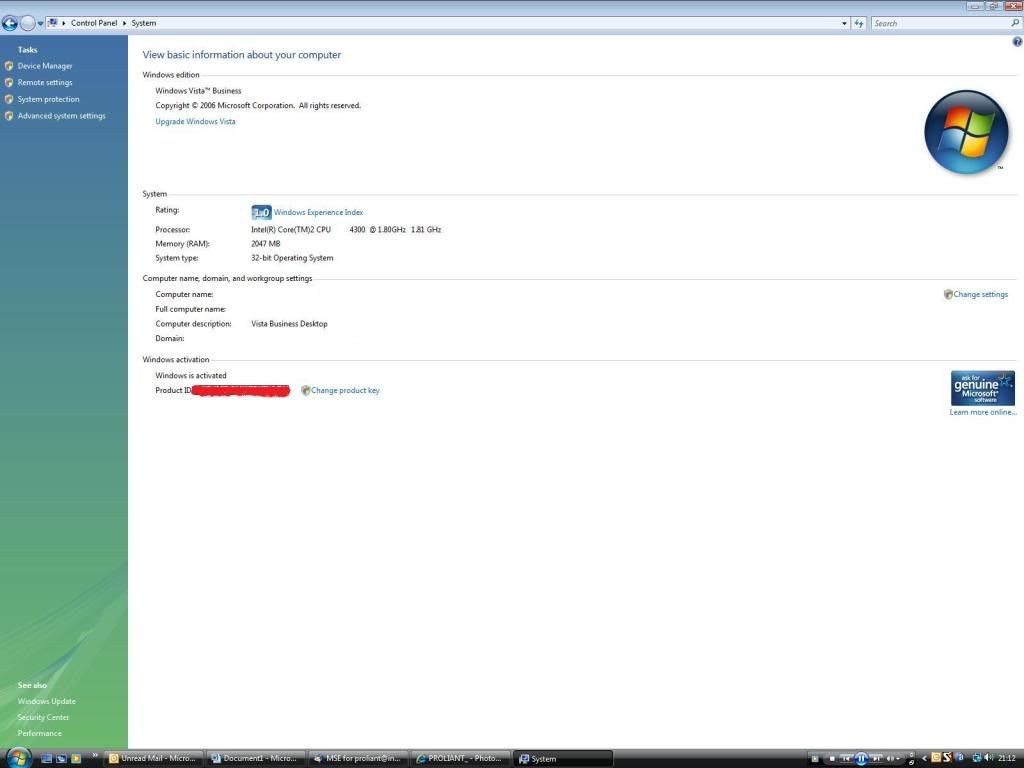 Since when has the world of computer software design been about what people want? This is a simple question of evolution. The day is quickly coming when every knee will bow down to a silicon fist, and you will all beg your binary gods for mercy.0
 -
I use xp will this be the same procedure and how do I find how much space is used?
Does 2gb Ram sound sufficient?0 -
I would recommend downloading Everest Home free edition (think major geeks have a mirror site for downloads).
It will display the CPU size - type, speed, how much RAM you have. what graphics card you have etc and other info about your systemDon't try to teach a pig to sing - it wastes your time and annoys the pig0 -
I use xp will this be the same procedure and how do I find how much space is used?
Does 2gb Ram sound sufficient?
For memory: click My Computer and on top left "view system information"
For hard drive space: click My Computer then right click C: drive and then properties
2gb ram is sufficient0 -
The program "System Information for Windows" gives you a huge amount of information about your system - the type of CPU, motherboard type, number of RAM slots, the amount of RAM in each slot... and loads of other (possibly) interesting details!
http://www.gtopala.com/siw-download.html0



This discussion has been closed.
Confirm your email address to Create Threads and Reply

Categories
- All Categories
- 354K Banking & Borrowing
- 254.3K Reduce Debt & Boost Income
- 455.3K Spending & Discounts
- 247.1K Work, Benefits & Business
- 603.7K Mortgages, Homes & Bills
- 178.3K Life & Family
- 261.2K Travel & Transport
- 1.5M Hobbies & Leisure
- 16.1K Discuss & Feedback
- 37.7K Read-Only Boards