We’d like to remind Forumites to please avoid political debate on the Forum.
This is to keep it a safe and useful space for MoneySaving discussions. Threads that are – or become – political in nature may be removed in line with the Forum’s rules. Thank you for your understanding.
📨 Have you signed up to the Forum's new Email Digest yet? Get a selection of trending threads sent straight to your inbox daily, weekly or monthly!
The Forum now has a brand new text editor, adding a bunch of handy features to use when creating posts. Read more in our how-to guide
SSD - Put HDD in DVD Caddy

DoaM
Posts: 11,863 Forumite



I'm looking to replace my laptop HDD with an SSD (maybe this one), and put the existing HDD into a caddy in place of the DVD drive. I've taken out the DVD and roughly measured the thickness of the metal casing ... it is between 12 and 13 mm.
Does that mean I need something like this caddy rather than a 9.5 mm version?
Edit: This is my laptop with the base cover off. The DVD fascia can be seen at the right and the existing HDD is clearly visible.
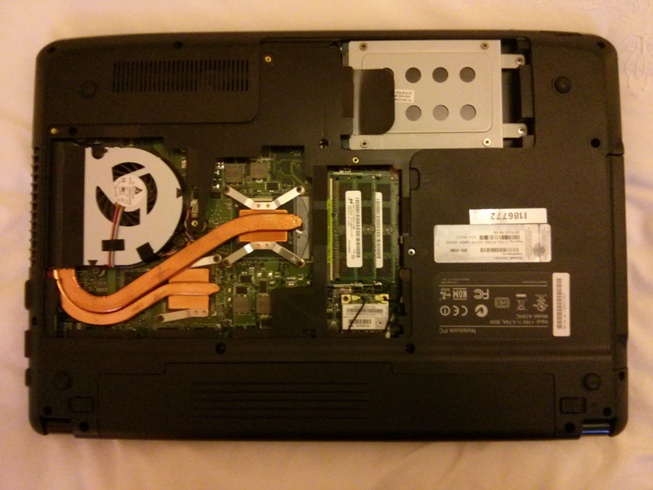
Does that mean I need something like this caddy rather than a 9.5 mm version?
Edit: This is my laptop with the base cover off. The DVD fascia can be seen at the right and the existing HDD is clearly visible.
0
Comments
-
I would say yes, if you have measured between 12 and 12, then the 12.7mm should be the one.
Remember to keep your DVD drive, it's highly likely that you will need to remove some mounting brackets or screws from it and put them in the new enclosure.0 -
Cheers. I've seen a mounting bracket that needs to come off the DVD caddy - it's where that screw you see between the RAM modules and the product key label screws in to.

I won't be throwing away the DVD - I may need it at some point. (I'll probably end up putting it into an external USB caddy for future ease of use, but one step at a time). 0
 -
Is that an Acer?
Anyway, yes, you normally have one screw that fixes the drive to the laptop, but sometimes you also have the interface card, which basically aligns the SATA port on the drive to the SATA port on the mainboard.0 -
It's a CyberPower X6-9200 laptop, based on a Pegatron A15HC motherboard.0
-
I've taken the DVD out again and the caddy I linked measures up correctly.
Any thoughts on the SSD I linked?0 -
I bought this a couple of weeks ago https://www.scan.co.uk/products/500gb-samsung-860-evo-25-ssd-sata-iii-6gb-s-mjx-mlc-v-nand-512mb-cache-read-550mb-s-write-520mb-s-98?gclid=Cj0KCQjw6rXeBRD3ARIsAD9ni9D5J9MY3gGX0RmnUDnx0iu29xZqMtLNnDijOMvD8Y08SuTGfZCSyYwaAm2kEALw_wcB and am really pleased with it.0
-
-
hollie.weimeraner wrote: »I bought this a couple of weeks ago https://www.scan.co.uk/products/500gb-samsung-860-evo-25-ssd-sata-iii-6gb-s-mjx-mlc-v-nand-512mb-cache-read-550mb-s-write-520mb-s-98?gclid=Cj0KCQjw6rXeBRD3ARIsAD9ni9D5J9MY3gGX0RmnUDnx0iu29xZqMtLNnDijOMvD8Y08SuTGfZCSyYwaAm2kEALw_wcB and am really pleased with it.
Thanks. I found the same item on Amazon cheaper (albeit without the "free" game) and free delivery (I have Prime). 0 -
Update:
SSD and HDD caddy received. Windows installed on the SSD (dead easy and activated itself). Now I'm busy reinstalling what I need. (Office already done).
The HDD in the DVD bay caddy wasn't being recognised. I had to go into BIOS (where the drive could be seen) and deselect it as a boot drive - once I did that then everything started working just fine. 0




This discussion has been closed.
Confirm your email address to Create Threads and Reply

Categories
- All Categories
- 353.7K Banking & Borrowing
- 254.2K Reduce Debt & Boost Income
- 455.1K Spending & Discounts
- 246.8K Work, Benefits & Business
- 603.3K Mortgages, Homes & Bills
- 178.2K Life & Family
- 260.8K Travel & Transport
- 1.5M Hobbies & Leisure
- 16K Discuss & Feedback
- 37.7K Read-Only Boards