Ready, steady… save!
You don’t need a chart to join in. Here are 2 ways to record your savings:
1. Cross it off
Pop a chart into your first post. Saved an amount? Cross it out! Read more »
£0.01 £0.02 £0.03
2. Write it down
Skip the chart and add updates to your first post. Read more »
“Another +£3 saved today. Go me!”
Use +£ before each new saving so it counts towards your total.
📨 Have you signed up to the Forum's new Email Digest yet? Get a selection of trending threads sent straight to your inbox daily, weekly or monthly!
Sort By Closing Date missing (Sep/Oct 2026)
Comments
-
avscomps said:Hello! I'm fairly new to this part of the forum, when I use the option to sort by closing date, it shows me ones with a closing date of 00/00 or 31/12 or ones in 2027!
How can I filter them so it shows the closest closing dates (a.k.a today/tomorrow) rather than those very fair in the future?
Also, is there a way to filter out those I've already marked as entered? I don't need to keep seeing them once I've entered
Sort by closing date then go to the end of the list (currently page 89) then work back from there.
The extract below shows where today's 28/10 comps change to tomorrow's 29/10 on page 88.
There is no way to filter out those you have already entered.
Use the ticks/crosses properly and you can quickly review a page to see if you have dealt with them.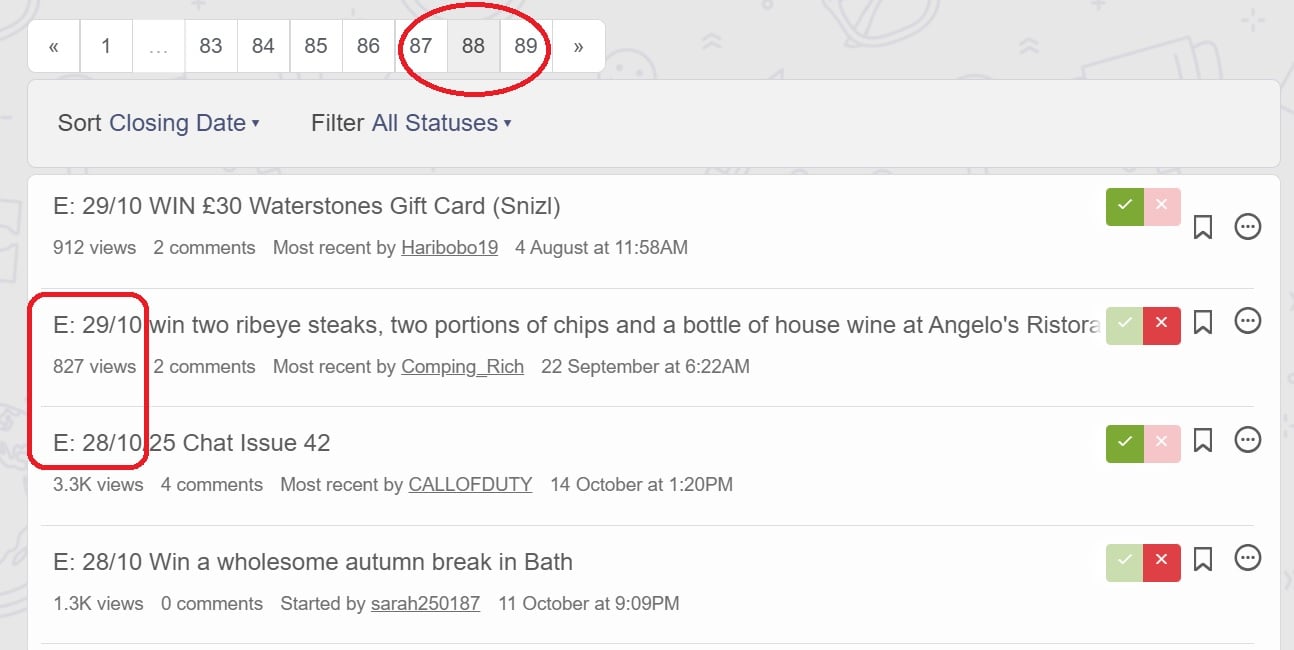
2 -
https://forums.moneysavingexpert.com/categories/competitions-time/p89?sort=closing-date
If you go to the last page it will show you todays/tomorrows, you'll have to work backwards then eg, page 89, 88, 87.
There's no way to filter out the entered ones.0 -
I’ve just noticed this 😞
Good luck everyone ❤️
Jan: PD Holiday and £500,
March: 2x£5 Costa vouchers (IG), mug shots, Whitworths bits (IG), £150 Pizza Express Voucher, Self-care bundle (IG)
April: Lego creator pirate set
May: Wellbeing experience, £1000 MATALAN voucher!Sept: £150 Tesco Voucher (TTW), Tech Package inc 50” TV (Radio)!
Oct: Wallace & Grommet stockings, Bloody Mary kit
Dec: Idris E Cognac (IG), Wyke & Godminster hamper (IG), £850 advent prize from Rose & Ivy (IG), beanbag, £150 RI voucher & wreath (IG)3 -
Just noticed the same issue, and the format appears to change how my 'bookmarked' threads are displayed, wit more text and the link being shown?
4 -
has anyone else’s closing date drop down box disappeared
2013 wins..... Disney on ice VIP tickets...amazon Kindle2 -
yes mine has gone too
1 -
I was hoping it was just me as at least then I know I could fix it 😬
I wonder why it’s been changed I always enter by end date so no idea where to start with it now.Happy Comping All!3 -
I came here to comment on the very same thing ! What the heck is happening ? Also, the categories we're left with are too similar - 'Top, New & Hot'
3 -
Mine has gone too and my bookmark no longer works.
@MSE_Stephen can you help by fixing it please
6 -
Suggests it was fixed earlier but missing again for me
1















Confirm your email address to Create Threads and Reply

Categories
- All Categories
- 355.9K Banking & Borrowing
- 255K Reduce Debt & Boost Income
- 456.2K Spending & Discounts
- 248.4K Work, Benefits & Business
- 606.1K Mortgages, Homes & Bills
- 179K Life & Family
- 263.9K Travel & Transport
- 1.5M Hobbies & Leisure
- 16.2K Discuss & Feedback
- 37.7K Read-Only Boards