We’d like to remind Forumites to please avoid political debate on the Forum.
This is to keep it a safe and useful space for MoneySaving discussions. Threads that are – or become – political in nature may be removed in line with the Forum’s rules. Thank you for your understanding.
Cleaning up a LOT of JPG's




I have folders of JPGs on my PC - photos taken over a lifetime plus old family photos from over 150 years ago.
I have more than 4000 JPGs
The whole folder is subdivided in to many other folders with copies and naming of images all over the shop.
Is there some automatic way (download or whatever) of removing copies of images and renaming and tidying the whole lot - in some clearer way ?
The problem is made more complex - because I also have folders of docs/certificates etc related to Ancestry in various folders which are mostly JPGs too and nothing to do with this problem - so I can't just search on JPG on C: drive !!
If I was half as smart as I think I am - I'd be twice as smart as I REALLY am.
Comments
-
Using an automated system sounds like a good way to delete something important to my mind. Back everything up first regardless of how you do it.
"photos taken over a lifetime plus old family photos from over 150 years ago"
I knew you were clocking on but I didn't know you were that old.
4 -
I wish I had your problem. 😁
Our family images folder contains 216,506 Files AFTER many hours of re-organisation!
Sorting / Duplicate Spotting
There really isn't an easy way of organising photos because it needs the intervention of a human who
understands what they are to decide to keep or not, or where they should go.Our main problem was duplication over the years there are a number of duplicate file finding programs which will search for exact copies or very similar images and let you choose which to keep and which to delete.
Also putting all of your photos of a certain event in one folder and then sorting by size is another way of spotting identical duplicates as they will sit next to each other.
Renaming:Renaming needs a good bit of thought. I eventually decided on the format
yyyy-mm-dd hh.mm.ss - Orignal Filename
Because you can then sort these alphabetical order (which will also be chronological order) no matter what the file metadata has embedded within the images.
For this I use a program called advanced renamer which is very powerful, and can do this renaming using the metadata in the files if it is correct, but it is also very dangerous if used incorrectly, so as @JSmithy45AD says, back up everything first (though, of course, family photos should be backed up already!).
Now I have everything in one place, the trick is to MOVE (not copy) all new files in that location and nowhere else, and then once you have, back it up (I use a program called Freefilesync which has a "Mirror" function whch duplicates location A to location B, and then back that backup up too if you are paranoid (like me)! 👍️
• The rich buy assets.
• The poor only have expenses.
• The middle class buy liabilities they think are assets.1 -
I use VisiPics for finding and removing duplicate images, it can also find near duplicates, eg edited or resized, or cropped, or ,,,,, images and you can set how close a match to look for.
You specify what folders/sub-folders to search in so it will only search the ones you want it to do.
https://visipics.info/Irfanview has a 'Batch Convert/Rename" tool that can help rename files (any files not just images) into a sequential order.
You can set a mask for the rename, so it's not just numbers.
https://www.irfanview.com/
Suprisingly many people who have Irfanview don't know the batch tool is there, it's in the 'File' menu.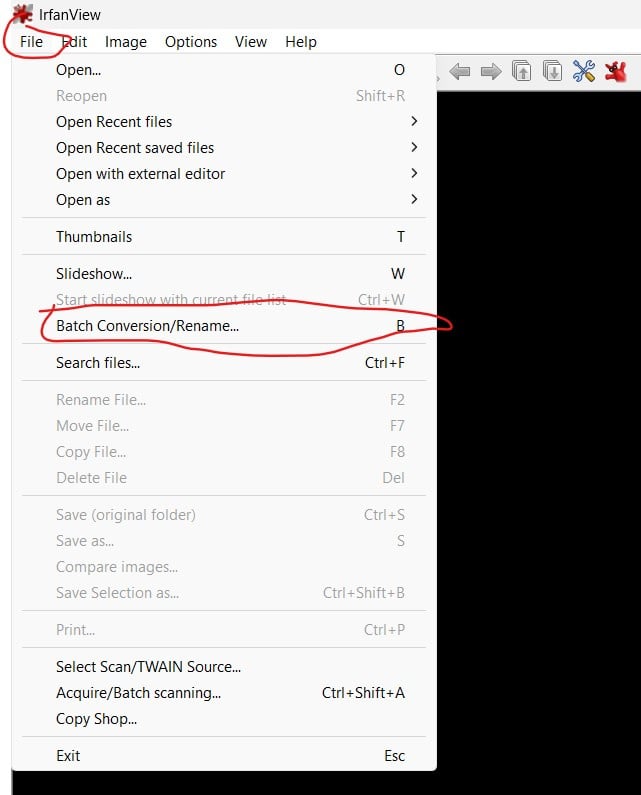
Both applications do have a lot of options, but are not too complicated to use - As said make backups before trying any reorganisation like the one you are proposing.
2 -
I solved it the obvious way. Put the subjects on separate memory sticks. Then went through the folders deleting the unwanted. Otherwise you tend to keep the lot.
Moving things would tell me if a picture was repeated.
I found it safer to do it this way and make sure that a 'repeated' photo was actually the same.
It was also doable in small amounts without going cross eyed and getting brain spinning. In fact quite satisfying.
I know someone who is doing this once a week at an internet support group so there's company, coffee and help.
Reminds me I need to get to it again. Surprising what photos become unimportant when you go back to them.
I can rise and shine - just not at the same time!
viral kindness .....kindness is contageous pass it on
The only normal people you know are the ones you don’t know very well
1 -
For just basic finding duplicate files & deleting them I use Auslogics. Files don't have to have the same file name. One could be called 1 & another photo called 2 but if it's a copy then Auslogics will detect it & then give you options of what to do with the file.
0 -
"Moving things would tell me if a picture was repeated."
Not quite; Windows would warn you if a name was repeated.
However "Photo 1" in one folder could be an entirely different image to "Photo 1" in a different folder even though the name is the same.
And of course copied images may have been renamed, the images themselves are still duplicates.
2 -
I use Ccleaner to identify duplicate files.
Speed up, optimize and clean your PC for free | CCleaner for PC
"A nation's greatness is measured by how it treats its weakest members." ~ Mahatma Gandhi
Ride hard or stay home :iloveyou:1 -
Please tell me you have backups of these numerous memory sticks. I have had flash drives spontaneously fail on me too many times to trust them with anything I don't have another copy of and keep them for purely moving data from one place to another.
Moving things on top of other folders works well, but whenever you get duplicates flagged up it is important to check both the image and the SIZE of both to be sure that they are identical. Fortunatly this warning / compare function is built in to most recent versions of windows explorer.
Earler digital cameras and samsung phones had an awful habit of storing 2 copies of the same file with the exact same name - but one in a subfolder called "TN" these were the ThumbNail versions of the files to make browisng faster and were usually about 20-40kB in size, rather than the 4,000-8,000kB of the originals.
I know many people who have copied the smaller TN folder over the originals and then only realised muich later when they came to look at them enlarged and wondered why they look like garbage! 😨
• The rich buy assets.
• The poor only have expenses.
• The middle class buy liabilities they think are assets.4 -
Yikes, have you completed a full security scan recently? Not just the built in windows anti-virus?
CCleaner is absolutely chock full of dodgy installs and isn't recommended anymore.
1 -
Be very, very, very, careful of the "new" Duplicate Finder in CCleaner v7.
It has no filters that you can set on the search, and the batch select/delete is much too dangerous. (In most experienced users opinion).
If you are not very wary when using it you can in just a couple of clicks delete NEEDED Windows System, and other application, files.
This is not an empty warning.
I am a moderator on the CCleaner user forum and we have already seen several users posting there after they have "broken" their computers by using the new CCleaner7 Duplicate Finder without being careful.
They usually then have to reinstall Windows from scratch.
2









Confirm your email address to Create Threads and Reply

Categories
- All Categories
- 354.6K Banking & Borrowing
- 254.5K Reduce Debt & Boost Income
- 455.5K Spending & Discounts
- 247.5K Work, Benefits & Business
- 604.3K Mortgages, Homes & Bills
- 178.5K Life & Family
- 261.9K Travel & Transport
- 1.5M Hobbies & Leisure
- 16.1K Discuss & Feedback
- 37.7K Read-Only Boards