We’d like to remind Forumites to please avoid political debate on the Forum.
This is to keep it a safe and useful space for MoneySaving discussions. Threads that are – or become – political in nature may be removed in line with the Forum’s rules. Thank you for your understanding.
📨 Have you signed up to the Forum's new Email Digest yet? Get a selection of trending threads sent straight to your inbox daily, weekly or monthly!
The Forum now has a brand new text editor, adding a bunch of handy features to use when creating posts. Read more in our how-to guide
Hive not connecting Fixed !!!

Thomas_Holding
Posts: 509 Forumite



So I have checked our internet connection and I just get this message
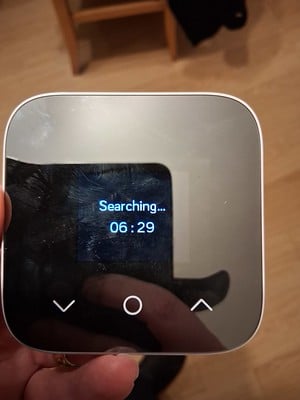
This is my hive receiver - when I looked on line I found it needs new batteries but mine is connected on line.
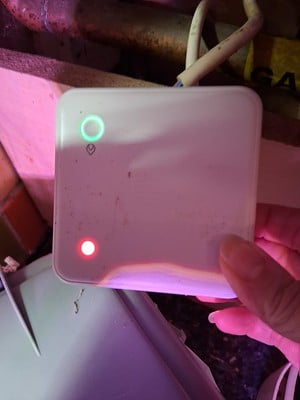
Any ideas? Thanks in advance.
This is my hive receiver - when I looked on line I found it needs new batteries but mine is connected on line.
Any ideas? Thanks in advance.
0
Comments
-
That's a Hive Mini - cute. The unit runs on batteries, but there's no suggestion that's the issue here - the App would soon tell you if it was. As would the Mini"s display.
The receiver with the red and green lights is the receiver, and is, indeed, mains powered, so no battery issue there either.
What to do? Without me looking it up, first try turning off both. Ie, cut the power to the receiver, which will likely mean turning off the whole 'boiler' supply switch for 10 seconds.
For the Mini, just remove a battery for 20 seconds.
Then redo and see if they reconnect.
If they don't, you should be able to override the Hive by pressing the button on the receiver - on and off as required.
When it's bedtime, press and turn it off.
If not resolved, use Hive 'chat' or phonecall on Monday - I have found them superb.1 -
Thanks I told my wife that - and she said, "I did all that." Fortunately it's not too cold.1
-
I have Hive (although not the mini) - are you talking about internet (as in access via phone app) or the connection between the controller (by the boiler) and the thermostat (hive mini)?
I ask because "Receiving..." means there's a connection issue between the controller and the hive mini. Are you too far away from the controller? Try setting it up near the boiler.3 -
The wee Hive Mini, being battery powered, is mobile, so Moneysaver's advice is good - unclip it from the wall, and position it closer to the receiver. Then,
https://support.hivehome.com/portal/app/portlets/results/viewsolution.jsp?solutionid=022434008394026
1 -
There is a ‘Hive Smart Heating and Smart Home Users’ Facebook group which is very helpful.3
-
Thank you the hive app is connected to the internet but can't connect to the mini. It looks like the receiver is not receiving. The internet is working - I am typing this using wifi.moneysaver1978 said:I have Hive (although not the mini) - are you talking about internet (as in access via phone app) or the connection between the controller (by the boiler) and the thermostat (hive mini)?
I ask because "Receiving..." means there's a connection issue between the controller and the hive mini. Are you too far away from the controller? Try setting it up near the boiler.
I wonder if the mini has lost connection for some reason - but how to fix that?0 -
Have you followed the guide?https://support.hivehome.com/portal/app/portlets/results/viewsolution.jsp?solutionid=022434008394026You press and hold the button on the receiver for the required time period, until you get the correct colour flashing light. Then you reinsert the battery in the Hive.Bring the Mini closer to the receiver - it doesn't have to sit on top, but just be within a few metres.I could read the 'presses' required and for how long, but best you do that yourself
 If all else fails, then Hive have been great on 'chat' and even on the phone with me in the past. But DO try the correct procedures first.
2 -
I did search yesterday and I didn't find that - thank you - the house is getting warmer.WIAWSNB said:Have you followed the guide?https://support.hivehome.com/portal/app/portlets/results/viewsolution.jsp?solutionid=022434008394026You press and hold the button on the receiver for the required time period, until you get the correct colour flashing light. Then you reinsert the battery in the Hive.Bring the Mini closer to the receiver - it doesn't have to sit on top, but just be within a few metres.I could read the 'presses' required and for how long, but best you do that yourself If all else fails, then Hive have been great on 'chat' and even on the phone with me in the past. But DO try the correct procedures first.2




Confirm your email address to Create Threads and Reply

Categories
- All Categories
- 353.5K Banking & Borrowing
- 254.2K Reduce Debt & Boost Income
- 455.1K Spending & Discounts
- 246.6K Work, Benefits & Business
- 603K Mortgages, Homes & Bills
- 178.1K Life & Family
- 260.6K Travel & Transport
- 1.5M Hobbies & Leisure
- 16K Discuss & Feedback
- 37.7K Read-Only Boards