We’d like to remind Forumites to please avoid political debate on the Forum.
This is to keep it a safe and useful space for MoneySaving discussions. Threads that are – or become – political in nature may be removed in line with the Forum’s rules. Thank you for your understanding.
📨 Have you signed up to the Forum's new Email Digest yet? Get a selection of trending threads sent straight to your inbox daily, weekly or monthly!
The Forum now has a brand new text editor, adding a bunch of handy features to use when creating posts. Read more in our how-to guide
Help me - pc won't load after bios download

mr_accountant
Posts: 823 Forumite




in Techie Stuff
Help please
My PC is is HP dx2420 Tower,
was running fine on Windows 10
I was running on BIOS 5.3 1 however I tried to be clever and went to a website and tried to download the latest version, ok my error but now the computer just won't work/start
When I press the power it says the following
award bootload bios version 1. 0
copyright 2000 bios ROM checksum error keyboard error no keyboard found detecting Ide atadi drive found CD-ROM try to boot etc
ALL my work is on here can anyone help me
My PC is is HP dx2420 Tower,
was running fine on Windows 10
I was running on BIOS 5.3 1 however I tried to be clever and went to a website and tried to download the latest version, ok my error but now the computer just won't work/start
When I press the power it says the following
award bootload bios version 1. 0
copyright 2000 bios ROM checksum error keyboard error no keyboard found detecting Ide atadi drive found CD-ROM try to boot etc
ALL my work is on here can anyone help me
0
Comments
-
Did you go to HP's website and look up your model number for the download or did you just find it off some random website somewhere?You've probably toasted your board. Your hard drive (with your data) is almost certainly fine.And this is why you don't update BIOS unless you really need to, and only then from official sources. A BIOS update file is not interchangeable between boards/computers - one won't work on another. If it was that incompatible it shouldn't have flashed.3
-
Some random website, is there anyway I can get the keyboard to respond, then try to go into bios, to see if hdd will load. I have also tried to put the keyboard into though old PS2 type connectors via an adapter still no keyboard responseNeil_Jones said:Did you go to HP's website and look up your model number for the download or did you just find it off some random website somewhere?You've probably toasted your board. Your hard drive (with your data) is almost certainly fine.And this is why you don't update BIOS unless you really need to, and only then from official sources. A BIOS update file is not interchangeable between boards/computers - one won't work on another. If it was that incompatible it shouldn't have flashed.0 -
OK so it looks like I'm stuffed re this motherboard.
If I buy the same second-hand motherboard and purchase another SSD transfer all the item over onto the 'new' MB, ram cpu etc, load up Windows 10 and transfer everything from the old SSD onto the new SSD, is this a workable plan0 -
Have you given all these steps a try first - in particular the BIOS recovery options at the end of the guide....with a USB stick to reload official BIOS?
https://support.hp.com/id-en/document/ish_3966820-3438449-16
2 -
Thanks for your suggestions I don't think the bios flash will work the keyboard is not responding at all. HP states to press Windows and b to load the bios
Looks like a new motherboard new SSD, reload everything again, transfer old files from ssd download all programs again, etc etc0 -
You don't need a new SSD. If you buy something with a similar/same chipset it should just boot straight up.Is this your computer?
1 -
mr_accountant said:Thanks for your suggestions I don't think the bios flash will work the keyboard is not responding at all. HP states to press Windows and b to load the bios
Looks like a new motherboard new SSD, reload everything again, transfer old files from ssd download all programs again, etc etc
Takes a couple of minutes and costs £0 to try out the BIOS recovery, personally I wouldn't dismiss it just because the crap BIOS refuses to recognise the keyboard - BIOS recovery is designed to recover from corrupt and unloadable BIOS and potentially monitors those key presses before the service BIOS being loaded.
What I'm saying is that it may well intercept those key presses before your crap BIOS takes a hold of things - it might work and costs nothing so what have you got to lose?
There was also some suggestions on the page above that about resetting the CMOS that are equally worth trying.
Up to you what you do, but I always attempt the quick and free fixes recommended by the manufacturer before getting my wallet out.2 -
Yes that's the tower, I've added a few things to keep it mildly in the modern era, notibly a 2gb graphics card, a 240gb ssd, and e8400 core2duo. It actually works very well with no lag, obviously no to modern games but I'm a bit to old for that!Neil_Jones said:You don't need a new SSD. If you buy something with a similar/same chipset it should just boot straight up.Is this your computer?
So do you think it will work just swapping the MB, I understood it won't eg the windows 10 recognises it's different and won't work and all the settings too.
I'm buying item no. 194026853051 which is identical from ebay, i will try it without swapping the hard drive if its does not work back to original plan0 -
I don't have another pc only smartphone so I would have to buy a otg cable and connect to a flash drive, I'm not great with computers but looking at the instructions it sounds doable.Deleted_User said:mr_accountant said:Thanks for your suggestions I don't think the bios flash will work the keyboard is not responding at all. HP states to press Windows and b to load the bios
Looks like a new motherboard new SSD, reload everything again, transfer old files from ssd download all programs again, etc etc
Takes a couple of minutes and costs £0 to try out the BIOS recovery, personally I wouldn't dismiss it just because the crap BIOS refuses to recognise the keyboard - BIOS recovery is designed to recover from corrupt and unloadable BIOS and potentially monitors those key presses before the service BIOS being loaded.
What I'm saying is that it may well intercept those key presses before your crap BIOS takes a hold of things - it might work and costs nothing so what have you got to lose?
There was also some suggestions on the page above that about resetting the CMOS that are equally worth trying.
Up to you what you do, but I always attempt the quick and free fixes recommended by the manufacturer before getting my wallet out.
If I had another pc I would try to load it onto a cdr and try it that way because as per my original post when powering up it's asking to put in a CD, if a had another pc I could download the latest version of the bios v5.31 to the cd and try it that way.
Re the cmos and bios I tried both but still the same, 'clearing the bios settings"
https://support.hp.com/gb-en/document/c01386897
0 -
mr_accountant said:
I don't have another pc only smartphone so I would have to buy a otg cable and connect to a flash drive, I'm not great with computers but looking at the instructions it sounds doable.Deleted_User said:mr_accountant said:Thanks for your suggestions I don't think the bios flash will work the keyboard is not responding at all. HP states to press Windows and b to load the bios
Looks like a new motherboard new SSD, reload everything again, transfer old files from ssd download all programs again, etc etc
Takes a couple of minutes and costs £0 to try out the BIOS recovery, personally I wouldn't dismiss it just because the crap BIOS refuses to recognise the keyboard - BIOS recovery is designed to recover from corrupt and unloadable BIOS and potentially monitors those key presses before the service BIOS being loaded.
What I'm saying is that it may well intercept those key presses before your crap BIOS takes a hold of things - it might work and costs nothing so what have you got to lose?
There was also some suggestions on the page above that about resetting the CMOS that are equally worth trying.
Up to you what you do, but I always attempt the quick and free fixes recommended by the manufacturer before getting my wallet out.
If I had another pc I would try to load it onto a cdr and try it that way because as per my original post when powering up it's asking to put in a CD, if a had another pc I could download the latest version of the bios v5.31 to the cd and try it that way.
Re the cmos and bios I tried both but still the same, 'clearing the bios settings"
https://support.hp.com/gb-en/document/c01386897
On the link I provided there was 2 options for BIOS recovery, one involved a USB, the other didn't.
Did you try the non-USB recovery option? Please note steps 1-3 in the image below in particular step 3 where it talks about 40 seconds.
By attempting this you will discover one of three things that make the next step easier to take:
1. It works and you've saved yourself a few quid MSE style.
2. The computer responds to the BIOS recovery keystrokes and does something different but fails to find the backup BIOS on your hard disk. This is a good result because it shows it is worth doing the USB method because you now know the recovery console is responding and will likely work with a USB BIOS.
or
3. It doesn't respond to the BIOS recovery procedure at all and then you know you have not missed the opportunity to save the price of a new motherboard by jumping ahead too quickly.
The thing about the unresponsive keyboard and asking for a CD etc is not relevant to what I'm describing here because BIOS recovery should execute before your incorrect service BIOS gets its knickers in a twist so anything you are experiencing from the wrong BIOS really isn't relevant.
Note this from the link and in the image below ... very important words....
This emergency recovery feature is separate from the BIOS and is designed to work in the event of a catastrophic BIOS failure.
I'm not just guessing and providing random links from the internet, I have recovered bricked BIOS several times in the past, it requires a little patience and attention to detail and instructions but is very rewarding when it works.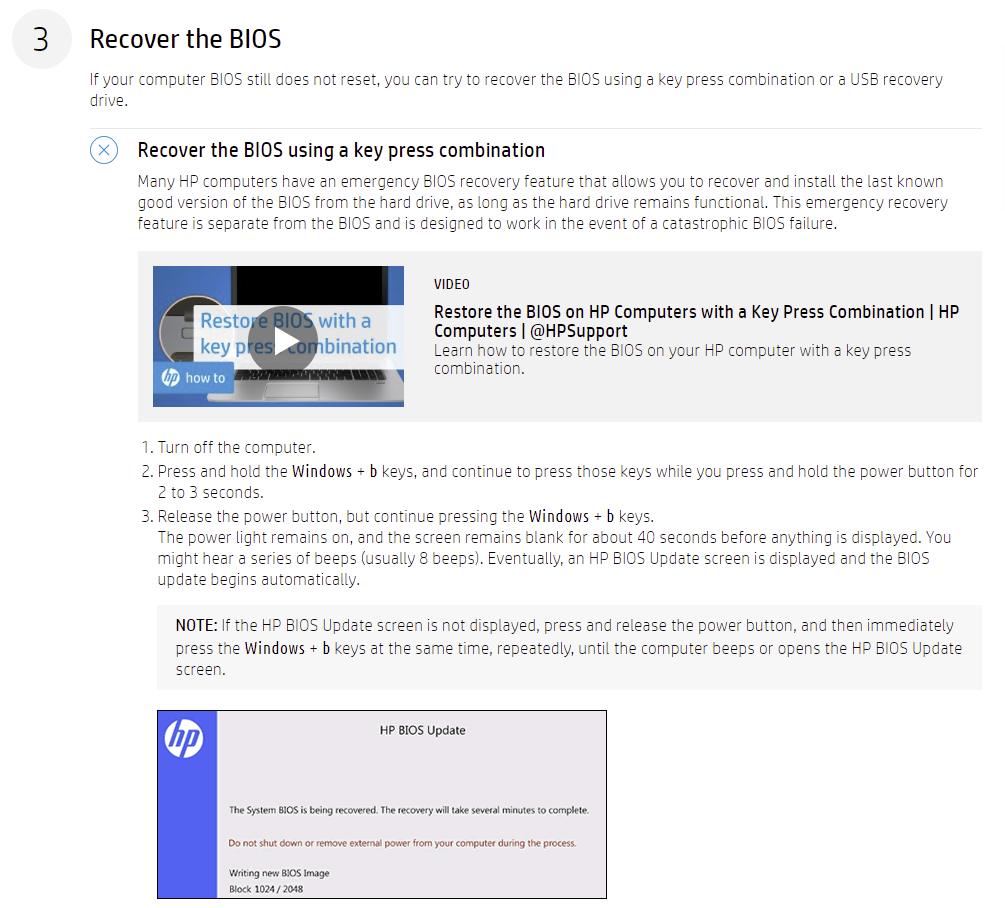
1




Confirm your email address to Create Threads and Reply

Categories
- All Categories
- 354K Banking & Borrowing
- 254.3K Reduce Debt & Boost Income
- 455.3K Spending & Discounts
- 247K Work, Benefits & Business
- 603.6K Mortgages, Homes & Bills
- 178.3K Life & Family
- 261.1K Travel & Transport
- 1.5M Hobbies & Leisure
- 16.1K Discuss & Feedback
- 37.7K Read-Only Boards