We’d like to remind Forumites to please avoid political debate on the Forum.
This is to keep it a safe and useful space for MoneySaving discussions. Threads that are – or become – political in nature may be removed in line with the Forum’s rules. Thank you for your understanding.
📨 Have you signed up to the Forum's new Email Digest yet? Get a selection of trending threads sent straight to your inbox daily, weekly or monthly!
The Forum now has a brand new text editor, adding a bunch of handy features to use when creating posts. Read more in our how-to guide
Command/program for determining PC's component parts ?

Mr_Frugal
Posts: 265 Forumite


in Techie Stuff
Hi, I was wondering if anyone knows of a command or a program that is/are available for me to be able to view my computers component parts (ie in this instance I want to determine what make etc my internal modem is).
I am sure there used to be a command in Dos that would bring all this info up but I have forgotten it !
Any help appreciated.
Thanks,
Mr_F.
I am sure there used to be a command in Dos that would bring all this info up but I have forgotten it !
Any help appreciated.
Thanks,
Mr_F.
0
Comments
-
Try downloading Belarc Advisor free software [1.5 Meg ] to give you detailed listing of hardware & software on your PC
On my PC shows modems as CNXT V92 Data Fax Voice [Modem] and Speedtouch USB ADSL PPP0 -
No need to download anything, simply look in Hardware, Device Manager, Modems.:doh: Blue text on this forum usually signifies hyperlinks, so click on them!..:wall:0
-
Belarc Advisor is good and as was said above it is also free.
http://www.belarc.com/free_download.html0 -
No need to download anything, simply look in Hardware, Device Manager, Modems.
Unfortunately this is no good for me. I am trying to get the modem in my girlfriends PC working correctly- it has an error message on boot up every time (in that it doesn't recognise it and brings up the install box (which in turn doesnt find anything and we cant find a relevant disk)).
I am assuming it is just missing the right driver so if i can determine what modem it is i should be able to Google it and find the right driver ??????
That's the thought process at least !0 -
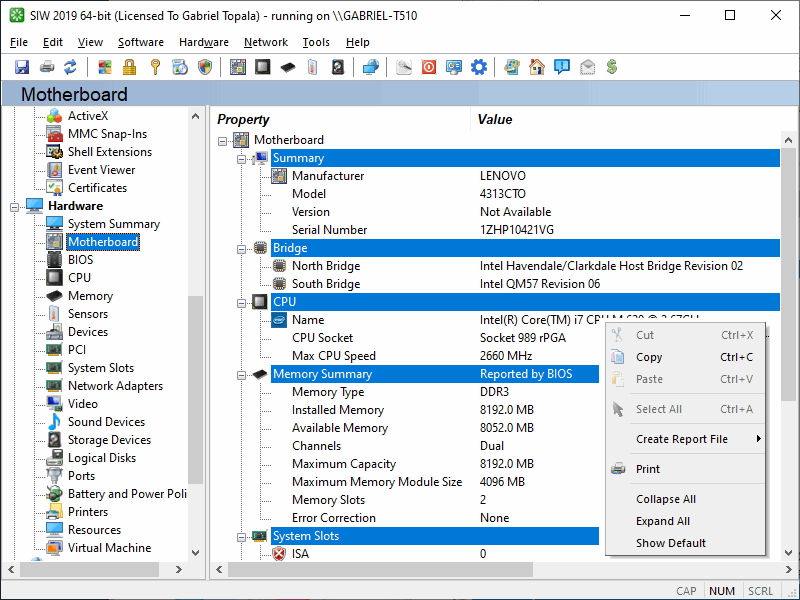
I recommend "System Information for Windows" (I assume you are using windows) and is available from here and is free for personal use
As well as showing hardware it will show you lots of other useful information about your system too.
Edit: Clickable screenshot of it in motherboard section 0
0 -
Unfortunately this is no good for me. I am trying to get the modem in my girlfriends PC working correctly- it has an error message on boot up every time (in that it doesn't recognise it and brings up the install box (which in turn doesnt find anything and we cant find a relevant disk)).
I am assuming it is just missing the right driver so if i can determine what modem it is i should be able to Google it and find the right driver ??????
That's the thought process at least !
OK I would recommend PCwizard then. (Free):doh: Blue text on this forum usually signifies hyperlinks, so click on them!..:wall:0 -
Try downloading Belarc Advisor free software [1.5 Meg ] to give you detailed listing of hardware & software on your PC
On my PC shows modems as CNXT V92 Data Fax Voice [Modem] and Speedtouch USB ADSL PPP
Thanks for this, have downloaded it on my PC (to test) and cant seem to locate where the 'modem' section is on report.
Where abouts are the modems listed on report ?
Thanks,
Mr_F.0 -
Please be aware that any of these sofware checks will probably only return the manufacturer of the modem's chipset, not the manufacturer of the whole device. They are not necessarily the same.
PS. Two thoughts - is it plugged into the expansion slot properly? Also, try the built-in generic v90 or v92 modem drivers. In my experience, these work just as well as, and in some cases better than, the manufacturers' drivers.The acquisition of wealth is no longer the driving force in my life. 0
0 -
Errm why not take the side off the PC and look at the modem card?
You will be able to tell which one it is from the location of the backplate where the line jack plugs in.0 -
Thanks for this, have downloaded it on my PC (to test) and cant seem to locate where the 'modem' section is on report.
Where abouts are the modems listed on report ?
Thanks,
Mr_F.
Sorry, don't know where it is in bellarc, but in the one i recommended (if you get it) its under Hardware>Ports>Modem0





This discussion has been closed.
Confirm your email address to Create Threads and Reply

Categories
- All Categories
- 354K Banking & Borrowing
- 254.3K Reduce Debt & Boost Income
- 455.3K Spending & Discounts
- 247K Work, Benefits & Business
- 603.7K Mortgages, Homes & Bills
- 178.3K Life & Family
- 261.2K Travel & Transport
- 1.5M Hobbies & Leisure
- 16.1K Discuss & Feedback
- 37.7K Read-Only Boards