We’d like to remind Forumites to please avoid political debate on the Forum.
This is to keep it a safe and useful space for MoneySaving discussions. Threads that are – or become – political in nature may be removed in line with the Forum’s rules. Thank you for your understanding.
📨 Have you signed up to the Forum's new Email Digest yet? Get a selection of trending threads sent straight to your inbox daily, weekly or monthly!
The Forum now has a brand new text editor, adding a bunch of handy features to use when creating posts. Read more in our how-to guide
Spam

ALISON_1667
Posts: 3 Newbie
I'm new to this and made my first mistake. I entered a holiday competition and was then subsequently rang up to be offered a holiday at a cut rate ( so they said). hmmmmm. Not so much of a win.
0
Comments
-
What site was it via ?ALISON_1667 wrote: »I'm new to this and made my first mistake. I entered a holiday competition and was then subsequently rang up to be offered a holiday at a cut rate ( so they said). hmmmmm. Not so much of a win.
Did you find the comp on here?
I will pm a BG re moving this to: Compers Chat Corner
PM sent to Glad0 -
No it wasnt from this site. It was on my first encounter searching competitions on line.0
-
My advice is to just enter via MSE.ALISON_1667 wrote: »No it wasnt from this site. It was on my first encounter searching competitions on line.
The comps are usually genuine as any "dodgy" comps are soon flagged up .
Then you can use the MSE functionalility to track your entries ie as in my next post.
I appreciate that there are other comp portals in the UK but using multiple portals to enter comps is a recipe for duplicate entries that may result in void entries.0 -
Comping Guide - Getting Started & Other FAQs
2 How do I keep track of which comps I’ve entered and what are the green ticks and red crosses for?
Do make sure you are a member of MSE because when you are logged in it will make keeping track of the comps you have already entered a lot easier.
Note: If you are not logged in ‘Thanks’, ‘green tick’ and ‘red cross’ buttons do not appear.
When I look at the forum, I can sometimes tell from the title of the thread if it is a comp that I would be interested in entering. If I see a comp that I don’t want to enter then I click the faded red cross button to indicate to myself that I have already made a decision about entering and have decided to skip it.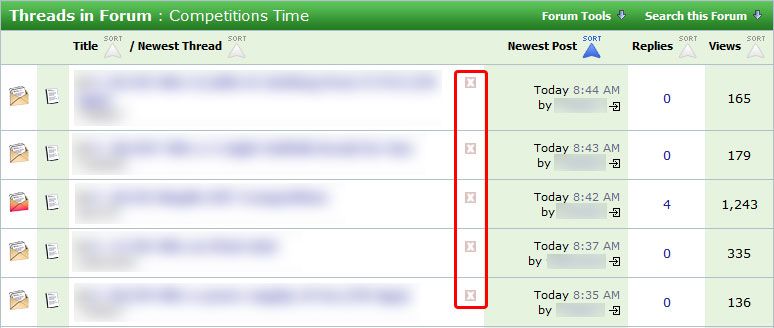
If I can’t tell from looking at the title if I want to enter, I open that thread and read more to make my decision. If I don't want to enter, then I click the 'Thanks' button (since I’m in the thread anyway) to thank the OP (Original Poster) for sharing. (It is hard work to find a comp that hasn’t already been posted!) I also click the red cross button to let me know that I’ve already checked out that comp and decided to skip it. Either of the red crosses that you can see on the post will do the job!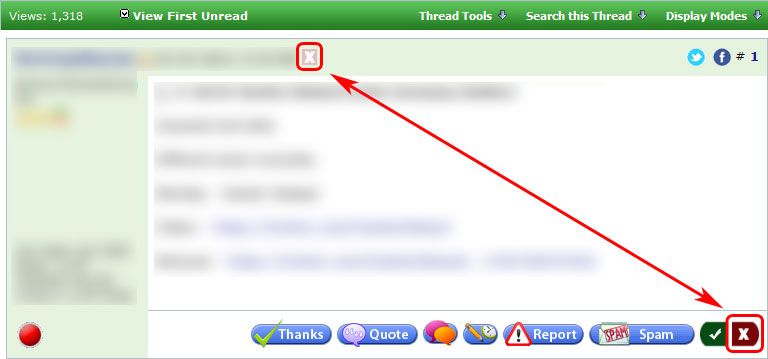
If I decide to enter, I click the 'Thanks' button to thank the OP, but will also click the green tick button to show me that I've entered.
By using the red cross and green tick buttons, I can very quickly see the comps that I haven’t yet reviewed. If you click any of these buttons by mistake then click again to reverse the action.
Some comps will void your entries if you enter more than once so I strongly recommend using these buttons to help you keep track.
When you return to the main forum page, you will see which comps you have skipped/entered as they will have a red cross or a green tick. You can focus your comping time and energy most efficiently on the comps with just a faded red cross as these are the comps that you still need to review.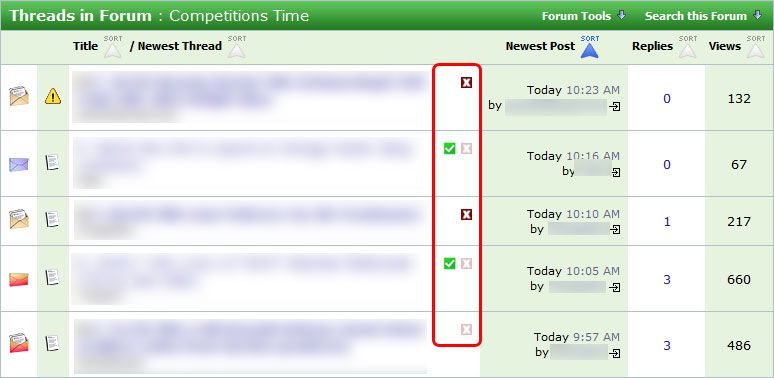
Please note: Don’t reply to the post "thanks" or "just entered" etc. This will bump the thread back to the top of the Forum which can result in eager MSE Compers entering again by accident. This is very frustrating as they can then potentially disqualify themselves. ‘Bumping’ is also against the Forum rules (which I asked you to read in the Introduction). Don't be a bumper!
Before we had these buttons, the only way we could try to keep track was by subscribing to the threads themselves once the decision to enter/not enter had been made, (as well as click the ‘Thanks’ button to show your thanks to the OP). That displays a symbol beside each thread subscribed to. This is not something I would now recommend as it is clumsy and takes a more clicks than our lovely new buttons. (Please see insert below from MSE, as having too many subscribed threads can cause issues).0



This discussion has been closed.
Confirm your email address to Create Threads and Reply

Categories
- All Categories
- 353.7K Banking & Borrowing
- 254.2K Reduce Debt & Boost Income
- 455.1K Spending & Discounts
- 246.8K Work, Benefits & Business
- 603.3K Mortgages, Homes & Bills
- 178.2K Life & Family
- 260.8K Travel & Transport
- 1.5M Hobbies & Leisure
- 16K Discuss & Feedback
- 37.7K Read-Only Boards