Ready, steady… save!
You don’t need a chart to join in. Here are 2 ways to record your savings:
1. Cross it off
Pop a chart into your first post. Saved an amount? Cross it out! Read more »
£0.01 £0.02 £0.03
2. Write it down
Skip the chart and add updates to your first post. Read more »
“Another +£3 saved today. Go me!”
Use +£ before each new saving so it counts towards your total.
📨 Have you signed up to the Forum's new Email Digest yet? Get a selection of trending threads sent straight to your inbox daily, weekly or monthly!
Lost toolbar

mclaren2005
Posts: 767

 Forumite
Think husband must have been messing about with the computer yesterday now have lost toolbars, with my autofill on and name which I just click to fill in the forms Firefox have sat for ages trying to get it back and just can't figure it out I am no techie any advice please. Thank you.
Good Luck to everyone
0
Comments
-
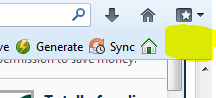
With FireFox you could try right clicking in the area in yellow below.Maybe right click just below the home/bookmarks buttons,if that makes sense.Then options to have Roboform should be part of the tick options.
 0
-
Click on view, then toolbars and click the ones you want

Hopefully that'll workA strong man stands up for himself, a stronger man stands up for others.0 -
this happened to me recently, it seems the latest Firefox update has caused a problem. I updated my version of Roboform from the RF website and this fixed it.0
-
I just had the same problem - think my FF updated itself last night - tried to update RF but it said it was up to date (but it isn't :S) Have downloaded/re-installed the previous FF (as per the reply on http://support.mozilla.org/en-US/questions/959724) and my RF's back!

Edit: With it back I clicked to check from RF update from the toolbar - it still said it was up to date but let me "redownload/update" (can't remember the term it used) anyway. Did that, and then tried re-updating FF. Happy to say both FF and RF are now up to date and the toolbar is working!0 -
While searching for information I found this
Declare your independence from passwords! Use discount code J4RF1 to receive 20% off RoboForm and RoboForm Everywhere0 -
I just had the same problem - think my FF updated itself last night - tried to update RF but it said it was up to date (but it isn't :S) Have downloaded/re-installed the previous FF (as per the reply on http://support.mozilla.org/en-US/questions/959724) and my RF's back!
Edit: With it back I clicked to check from RF update from the toolbar - it still said it was up to date but let me "redownload/update" (can't remember the term it used) anyway. Did that, and then tried re-updating FF. Happy to say both FF and RF are now up to date and the toolbar is working!
Thank you. That worked for me. 2019 Wins
1/25
£2019 in 2019
£10/£20190 -
This is driving me mad! It has just disappeared this morning for no reason, I don't think my FF has even updated recently. Still tried installing an old version and no joy, can't seem to get it back!
Edit: Ok, apparently I needed to go two versions back instead of one. Roboform has returned! Still very annoying it had to happen though.0










This discussion has been closed.
Confirm your email address to Create Threads and Reply

Categories
- All Categories
- 355.9K Banking & Borrowing
- 255K Reduce Debt & Boost Income
- 456.2K Spending & Discounts
- 248.4K Work, Benefits & Business
- 606.1K Mortgages, Homes & Bills
- 179.1K Life & Family
- 264K Travel & Transport
- 1.5M Hobbies & Leisure
- 16.2K Discuss & Feedback
- 37.7K Read-Only Boards