We’d like to remind Forumites to please avoid political debate on the Forum.
This is to keep it a safe and useful space for MoneySaving discussions. Threads that are – or become – political in nature may be removed in line with the Forum’s rules. Thank you for your understanding.
📨 Have you signed up to the Forum's new Email Digest yet? Get a selection of trending threads sent straight to your inbox daily, weekly or monthly!
The Forum now has a brand new text editor, adding a bunch of handy features to use when creating posts. Read more in our how-to guide
Andy Warhol-type pictures

bigdeebee
Posts: 2 Newbie
Hi
My son needs some artwork for the walls of his apartment and would like to use a personal photo and give it the 'Andy Warhol' treatment, i.e., as he did with the Marilyn Monroe picture in different colours. Does anyone know where he can get this done?
Many thanks.
Dee
My son needs some artwork for the walls of his apartment and would like to use a personal photo and give it the 'Andy Warhol' treatment, i.e., as he did with the Marilyn Monroe picture in different colours. Does anyone know where he can get this done?
Many thanks.
Dee
0
Comments
-
The easiest way is to find a friend with photoshop and ask them to do it.
Its pretty easy, but time consuming
e.g.
spending more time obviously gets better results, but the basic process is easy, and then you can just change the colours over0 -
If you have a Next Directory you can do it throught them and online0
-
just a quick thought, if they are not digital photos (of a reasonably high quality) then you are looking at screen printing, and that is going to cost you

just another one to show you how quick it is once youve done the initial bit0 -
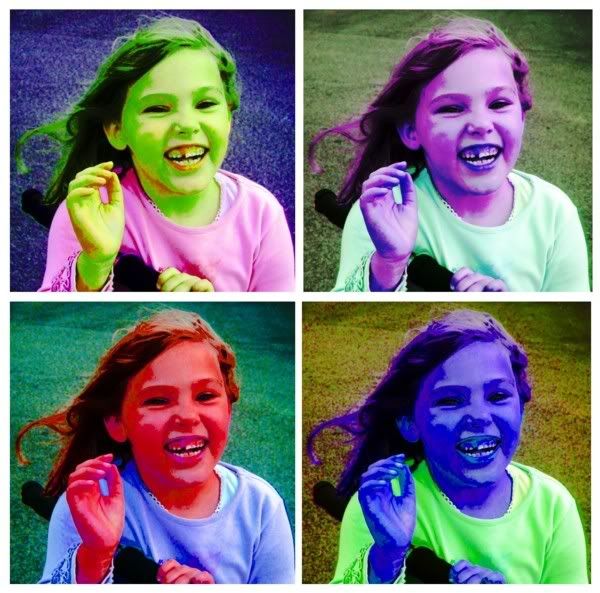
I'm not sure how it's done in Photoshop, but here's something I made in Photostudio 5 (which came free with my scanner) in just a few minutes.
All I did was...
1. Open original photo.
2. Use Enhance > Scratch Removal
3. then Enhance > Hue & Saturation - adjust sliders until effect is pleasing.
4. Save.
5. Repeat stages 3 & 4 to achieve different colour effects.
6. Edit > Add Border: do this with all 4 versions.
7. Effects > Stitch. Set Blend to 0. Stitch 2 pics together.
8. Repeat with the other 2.
9. Repeat with the 2 stitched pairs.
10. Save the result and you're done.
I'm not sure about other image editing programmes, but I expect the process would be fairly similar.0 -
the very easy way to do it is to use a dtp prog (i use serif) and change the colour. Doesn't quite give you the same effect as warhol but is ok.
this took under 2 mins (probably shows too;) )
http://allyoucanupload.webshots.com/b/20079212790996799100 -
Many thanks to all of you for your help and suggestions ... and so quickly too! Looks like his Christmas present is sorted!0



This discussion has been closed.
Confirm your email address to Create Threads and Reply

Categories
- All Categories
- 353.5K Banking & Borrowing
- 254.2K Reduce Debt & Boost Income
- 455.1K Spending & Discounts
- 246.6K Work, Benefits & Business
- 602.9K Mortgages, Homes & Bills
- 178.1K Life & Family
- 260.6K Travel & Transport
- 1.5M Hobbies & Leisure
- 16K Discuss & Feedback
- 37.7K Read-Only Boards