We’d like to remind Forumites to please avoid political debate on the Forum.
This is to keep it a safe and useful space for MoneySaving discussions. Threads that are – or become – political in nature may be removed in line with the Forum’s rules. Thank you for your understanding.
📨 Have you signed up to the Forum's new Email Digest yet? Get a selection of trending threads sent straight to your inbox daily, weekly or monthly!
The Forum now has a brand new text editor, adding a bunch of handy features to use when creating posts. Read more in our how-to guide
thank you martinsdoll & spacebabe and a question

oddies2
Posts: 94 Forumite
thank you martinsdoll:beer: and spacebabe:beer:, won a barrym lipstick which my grandaughter took off me straight away for her and her friend to play dress up,:rotfl::rotfl: and a bic soleil razor:cool: please could anyone tell me or point me in the right direction to add a signiture i keep winning things but dont know how to do it:mad:
0
Comments
-
:T:T:T lovely, well done :T:T
hi, you can find all that in velvetgloves comping guide..
for sigs..
9 How can I put what I've won into the bottom of my posts?
http://forums.moneysavingexpert.com/showthread.html?t=1014121&p=12237989
9 How can I put what I’ve won into the bottom of my posts?
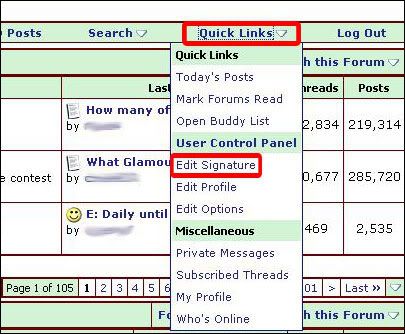
Near the top of the page, along the thin green bar, just below where is says 'Welcome (username)', select 'Quick Links'. A drop down list will appear, select 'Edit Signature'.
The next screen displays a box to type in your signature. Click ‘Save Signature’ & it will appear whenever you post on any MSE Forum. You can ‘Preview Signature’ to see how it will look, if you want, before you click to ‘Save Signature’.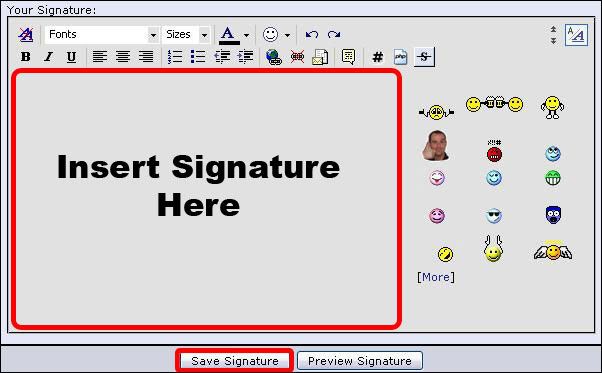
Do be aware that you are only allowed a certain number of lines/characters to avoid signatures being too large, the site now enforces this so don't panic, it will tell you if your signature is too big. It is a good idea to keep a copy of your signature information elsewhere in case the signature vanishes or is amended by the Forum Team. Remember links are not allowed in signatures unless they have been pre-approved by the Forum Team, so please don’t include any links in your signature.
please be a responsible pet owner & spay/neuter your pets, too many strays & not enough homes for them sadly. 0
0 -
well done on ur winsGot Married 16/09/11 :j0
-
:j:j:jWell done0
-
Well Done:DIf your neighbour's grass is greener, its time to water your lawn!:rotfl::rotfl:0
-
:T:TMany congratulations:T:T:happyhearJules xx :wave:
Wins in 2015
Drumond games win:jFootball:jPark & Recreation dvd:jFifty Shades of grey goody bag:jSupernatural 9 dvd.:jFox catchers DVD:jJumbo Game prize bundle:j ASDA Baby & Toddler New Born set:jHelly Hansen jacket, wallet & Boxers:j0 -
Well done
 Liz xx0
 -
thank you martinsdoll:beer: and spacebabe:beer:, won a barrym lipstick which my grandaughter took off me straight away for her and her friend to play dress up,:rotfl::rotfl: and a bic soleil razor:cool: please could anyone tell me or point me in the right direction to add a signiture i keep winning things but dont know how to do it:mad:
Many congratulations on winning those lovely prizes... :T
Big big thanks also to korkykins for her always very useful posts to help folks... :T
xxx................................... MSE MARTIN LEWIS ... :A ... THANK YOU.......................0 -
:TCongratulations:T
(smilies use up characters in your signature)0 -
well done :TR.I.P TO THE MOST AMAZING MAN PUT ON THIS EARTH! MY DAD XX 13/03/2010 love and miss you so much xxjan wins, uki goodies,necklace, case wkd, thomas goodies, sterilizer, 2 pairs boot, earings0






This discussion has been closed.
Confirm your email address to Create Threads and Reply

Categories
- All Categories
- 354.2K Banking & Borrowing
- 254.3K Reduce Debt & Boost Income
- 455.3K Spending & Discounts
- 247.1K Work, Benefits & Business
- 603.8K Mortgages, Homes & Bills
- 178.4K Life & Family
- 261.3K Travel & Transport
- 1.5M Hobbies & Leisure
- 16.1K Discuss & Feedback
- 37.7K Read-Only Boards