We’d like to remind Forumites to please avoid political debate on the Forum.
This is to keep it a safe and useful space for MoneySaving discussions. Threads that are – or become – political in nature may be removed in line with the Forum’s rules. Thank you for your understanding.
📨 Have you signed up to the Forum's new Email Digest yet? Get a selection of trending threads sent straight to your inbox daily, weekly or monthly!
The Forum now has a brand new text editor, adding a bunch of handy features to use when creating posts. Read more in our how-to guide
HTC 2HD > Windows 7 - won't connect

Dick_Turpin99
Posts: 394 Forumite
in Techie Stuff
I've just got one of these HTC 2hd phones and tried to hook it up to my laptop currently running on Win 7.
So connected it up via the USB cable, it shows in the task bar USB device list as a "generic RNDIS" so asume the connection thus far is good.
I downloaded Mobile Device 6.1 from Microsoft thinking I could then synch up, restarted the computer, opened the prog. & it will not connect to the mobile phone.
Why is this?
With it al connected if I hit "outlook synchronistaion" on the phone I get an error code "Synchronizing error 0x80072EE7"
It also seems like there's a simple piece of HTC software missing which should allow me so add/remove photos & files......but no software discs came in the phone box.
Any clues where to start?
So connected it up via the USB cable, it shows in the task bar USB device list as a "generic RNDIS" so asume the connection thus far is good.
I downloaded Mobile Device 6.1 from Microsoft thinking I could then synch up, restarted the computer, opened the prog. & it will not connect to the mobile phone.
Why is this?
With it al connected if I hit "outlook synchronistaion" on the phone I get an error code "Synchronizing error 0x80072EE7"
It also seems like there's a simple piece of HTC software missing which should allow me so add/remove photos & files......but no software discs came in the phone box.
Any clues where to start?
0
Comments
-
HTC Sync is normally supplied already installed (copied) on the memory card in the phone. You can transfer that onto the PC and install on the PC
I have a HTC Hero so the process may be different....
When I connect, I pull the drop down notification screen from the top of the phone.
The notification says "USB CONNECTED"
when I click on that I have an option of either connecting as a USB Device (used to move/copy stuff across) or to connect as a sync device (to sync data).
Until you select an option, it won't do anything.
You can also download HTC Sync from here after selecting your phone (do you mean HTC HD2?)
http://www.htc.com/uk/support.aspx
I never use the sync option though as I connect via my wireless network and sync through that.0 -
You see, I don't get this drop down menu. A red light comes on above the display indicating connection. I've removed the windows 6.1 mobile prog. now, but previously the red light on the phone was actually green.
Right, now through the computer > view drives I have opened the phones storage space & get these files.....
do I install them?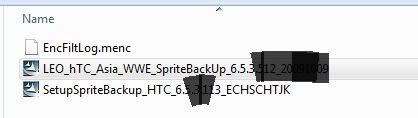 0
0 -
Could you clarify the Phone Model? Looks like yours is a Windows Mobile device. My Hero is an Android device so it will be different.
Regarding Sprite backup... Yes install the correct version for you (your pic has an Asian language version listed)3. Follow the on-screen instructions to install the Sprite Backup PC Manager to your computer and the Sprite Backup program onto your device.
To open Sprite Backup • On your device, tap Start > Programs > Sprite Backup.
Before you start to back up or restore files, please check the following: Make sure that the device storage memory has at least 15MB of free space. To
check, tap Start > Settings > System tab > Memory > Main tab. Make sure that the internal storage has at least 100MB of free space. To check,
tap Start > Settings > System tab > Memory > Storage Card tab. To back up data
1. To back up data remotely to a computer, enable the PC backup feature first. See “To enable remote backup to a computer” for instructions.
2. On the Sprite Backup main screen, tap Backup.
There's no need to blank out the software version numbers, it has nothing to do with your personal info
.0 -
-
I'm a bit rusty with devices running Windows Mobile. I have had a couple of HTC phones using in the past (C500, C600) and I too recall having difficulties with syncing it.
Try this
1. Slide to the Settings tab of the Home screen. Tap Other > USB to PC and then clear the Enable faster data synchronization check box.
2. Try it in some of the other USB Ports
EDIT: Do you have a firewall running (Zonalarm or similar? if so, try disabling it or adding an exception)
0 -
I'm a bit rusty with devices running Windows Mobile. I have had a couple of HTC phones using in the past (C500, C600) and I too recall having difficulties with syncing it.
Try this
1. Slide to the Settings tab of the Home screen. Tap Other > USB to PC and then clear the Enable faster data synchronization check box.
2. Try it in some of the other USB Ports
EDIT: Do you have a firewall running (Zonalarm or similar? if so, try disabling it or adding an exception)
Thanks Chris.
Have tried this, there's no zonealarm only windows firewall which flagged up about untrustedsoftware loading, I allowed it to continue working.
to be honest I am disapointed with the phone! - it wasn't cheap!!!.....even with the usb in and I find the 'my documents' folder if I put anything in there it doesn't find it on on the phone....seems there's two 'my documents' folders and they don't appear to be connected.
this phone is on its last warning otherwise i will be going back to the nokia!!!0 -
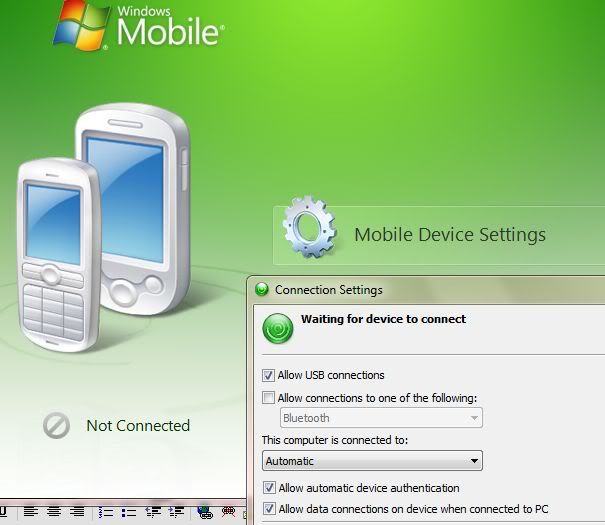
Have you installed/activated the mobile device centre on win7?Chris Elvin0
-
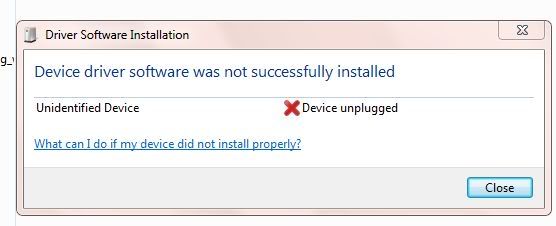
yes, also done this but still get a message to say its not connected
 0
0



This discussion has been closed.
Confirm your email address to Create Threads and Reply

Categories
- All Categories
- 353.6K Banking & Borrowing
- 254.2K Reduce Debt & Boost Income
- 455.1K Spending & Discounts
- 246.7K Work, Benefits & Business
- 603K Mortgages, Homes & Bills
- 178.1K Life & Family
- 260.7K Travel & Transport
- 1.5M Hobbies & Leisure
- 16K Discuss & Feedback
- 37.7K Read-Only Boards